
 Need help?
Do you have a question about the Valore AC90 and is the answer not in the manual?
Move the switch to turn the wireless mouse on or off.
Switch between Bluetooth and 2.4GHz wireless modes.
Explains the behavior of the Blue & Red LED for DPI and mode indication.
Details the four DPI levels adjustable via the DPI button.
Instructions for pairing via 2.4GHz wireless and Bluetooth modes.
Read all instructions and warnings carefully before using the product.
Information on copyrights, trademarks, and intellectual property.
This document describes the Valore 2-Way Connectivity Wireless Mouse (AC90), a versatile input device designed for seamless interaction with up to two computers. The manual provides comprehensive instructions on how to set up, use, and maintain the mouse, ensuring an optimal user experience.
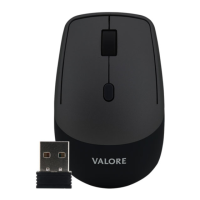
The Valore AC90 is a wireless mouse engineered for dual connectivity, allowing users to switch between two different computers effortlessly. This feature is particularly beneficial for individuals who work across multiple devices, such as a desktop and a laptop, or for those who need to control two systems from a single peripheral. The mouse supports both 2.4GHz wireless connectivity via a USB receiver and Bluetooth pairing, offering flexibility in how it connects to your devices. This dual-mode capability ensures broad compatibility with various operating systems, including Windows XP and above, as well as macOS 10 X and above.
The mouse is equipped with essential controls for navigation and customization. It features standard left and right buttons, a scroll wheel for vertical navigation, and a dedicated DPI button. The DPI button allows users to adjust the mouse's sensitivity on the fly, catering to different tasks that may require varying levels of precision, from general browsing to more detailed graphic design or gaming. An LED indicator provides visual feedback on the mouse's operational status, including its current connectivity mode and DPI setting. A function switch button facilitates the transition between the 2.4GHz wireless mode and Bluetooth mode, simplifying the process of connecting to different devices. For power management, the mouse includes an ON/OFF switch to conserve battery life when not in use, and it operates on a single AA battery.
Getting started with the Valore AC90 is straightforward. To power on or off the mouse, simply move the ON/OFF switch located on the underside of the device. The function switch is crucial for toggling between the two connectivity modes. When using the 2.4GHz wireless mode, no pairing is required; users just need to plug the provided USB receiver into their computer. The LED indicator will show a blue light to confirm it's in 2.4GHz wireless mode.
For Bluetooth connectivity, the process involves a simple pairing procedure. After switching to Bluetooth mode using the function switch, the LED indicator will turn red and then blink, signaling that the mouse is in pairing mode. Users can then search for "Valore AC90" in their computer's Bluetooth settings and connect. Once successfully paired, the computer will remember the device and automatically reconnect in the future, streamlining subsequent uses.
The DPI button offers four levels of sensitivity: 800 dpi (1st level), 1200 dpi (2nd level, default), 1600 dpi (3rd level), and 2400 dpi (4th level). Pressing the DPI button cycles through these settings, with the LED indicator flashing a corresponding number of times to show the current DPI level. In 2.4GHz wireless mode, the LED will flash blue, while in Bluetooth mode, it will flash red. This allows users to quickly ascertain and adjust their preferred cursor speed and precision for various applications.
The LED indicator also plays a role in signaling the current connectivity mode. When switching to 2.4GHz wireless mode, the indicator briefly shows blue for 3 seconds before turning off. When transitioning to Bluetooth mode, it shows red for 3 seconds before turning off. During the Bluetooth pairing process, the red LED will blink, indicating that the mouse is discoverable.
Proper maintenance and care are essential to ensure the longevity and optimal performance of the Valore AC90 wireless mouse. The user manual outlines several important cautions and guidelines to follow.
Firstly, it is crucial to avoid storing the product in high-temperature environments or near fire and other excessively hot conditions. Similarly, the mouse should not be exposed to moisture or submerged in liquid; it must be kept dry at all times to prevent internal damage.
Users are advised against attempting to disassemble, repair, or modify the product in any manner. Any such actions could void the warranty and potentially damage the device. If the product requires servicing or repair, it is recommended to contact Valore's technical support.
Battery usage, especially by children, should be supervised. The mouse uses a single AA battery, which is not included in the package. When replacing the battery, ensure it is inserted correctly into the battery compartment located on the underside of the mouse.
The manual also emphasizes caution regarding physical impacts. Excessive drops, bumps, abrasions, or other impacts can cause damage such as dents, punctures, tears, deformities, or corrosion. In the event of any such damage, users should immediately stop using the product and contact Valore for assistance via email or return it to the point of purchase.
Furthermore, if the product exhibits abnormal behavior, such as producing an unusual smell, becoming excessively hot (beyond normal operating temperatures), discolouring, or changing shape abnormally, users should cease use immediately and contact technical support. These symptoms could indicate a serious internal issue that requires professional attention.
For technical support or warranty registration, users can reach out to Valore via email at v.info@valore.sg or visit their website at www.valore.sg. Adhering to these maintenance guidelines will help ensure the Valore AC90 remains a reliable and functional peripheral for an extended period.
 General
| Connectivity | Wireless |
|---|---|
| Wireless Technology | 2.4 GHz |
| Operating Distance | up to 10 meters |
| Number of Buttons | 3 |
| Interface | USB |
| DPI | 800/1200/1600 |
| Color | Black |
| Battery Type | 1 x AA Battery |

 To Next Page
