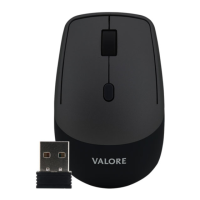
The Valore Dual-mode Wireless Mouse (AC190) is a versatile input device designed for seamless connectivity across various systems and devices. It offers a flexible dual-mode wireless connection, allowing users to switch between 2.4GHz and Bluetooth (BT) modes, providing broad compatibility and ease of use.
Function Description:
The mouse features a standard set of controls including a left key, right key, scroll wheel, forward key, backward key, and a DPI button. The DPI button allows for on-the-fly adjustment of sensitivity, with resolutions of 1200, 1600, and 2400 DPI. This adaptability caters to different user preferences and tasks, from precise graphic design to fast-paced gaming. The dual-mode functionality is managed via a pairing button and a power switch located on the underside of the mouse. The 2.4GHz mode utilizes a USB dongle for a simple plug-and-play experience, while the BT mode allows for direct connection to Bluetooth-enabled devices without the need for a dongle.
Important Technical Specifications:
- System Support: Compatible with Windows 8.0 and above, Android 4.3 and above, and macOS 10.10 and above.
- Transmission Distance: Up to 10 meters, offering freedom of movement.
- Battery Type: Uses one AA alkaline battery.
- Resolution: Adjustable at 1200/1600/2400 DPI.
- Material: Constructed from durable ABS plastic.
- Dimensions (L x W x H): 123.7 x 76.6 x 43.2 mm.
- Weight: 88g, making it lightweight and portable.
- Package Contents: Includes one Dual-mode Wireless Mouse, one USB Dongle, and one AA Battery.
Usage Features:
The Valore mouse is designed for straightforward operation.
- Battery Installation: To install the battery, open the battery compartment, insert one AA alkaline battery ensuring correct polarity, and then close the compartment.
- BT Mode:
- Switch on the mouse using the power switch.
- Press the pairing button to switch to BT mode.
- Enable Bluetooth on your device.
- Long press the pairing button; the BT indicator light will start flashing.
- Connect to the mouse from your device's Bluetooth settings.
- 2.4GHz Mode:
- Retrieve the USB receiver (dongle) from its storage slot on the bottom of the mouse.
- Plug the receiver into a USB port on your device.
- Press the pairing button to switch to 2.4GHz mode. The mouse is then ready for use.
- When not in use, the receiver can be stored back in the mouse to prevent loss.
- DPI Adjustment: The dedicated DPI button allows users to cycle through the available DPI settings (1200, 1600, 2400) to match their preferred cursor speed and precision.
- Ergonomics: The dimensions and weight suggest a design that is comfortable for extended use, suitable for both office work and casual browsing.
Maintenance Features:
The manual emphasizes several cautions to ensure the longevity and safe operation of the device:
- Environmental Protection:
- Avoid storing the product in high-temperature environments or near fire.
- Do not expose the product to moisture or submerge it in liquid; keep it dry at all times.
- Do not place the product near excessively hot environments.
- Physical Integrity:
- Do not disassemble, attempt to repair, or modify the product.
- Avoid exposing the product to strong impacts or using it on rough surfaces.
- In case of serious damage (dents, cracks, abrasion), discontinue use and contact customer support.
- Operational Safety:
- If the product produces any abnormal smell, heats up unusually during use, or shows unusual changes in form or color, stop using it immediately and contact customer support.
- Cleaning: While not explicitly detailed, the ABS material suggests that the mouse can be cleaned with a soft, dry cloth. Avoid harsh chemicals or abrasive materials.
The Valore Dual-mode Wireless Mouse is a reliable and adaptable peripheral, offering convenience and performance for a wide range of users and computing environments. Its dual-mode connectivity, adjustable DPI, and ergonomic design make it a practical choice for everyday use. Adhering to the provided cautions will help maintain its functionality and extend its lifespan.

 Need help?

 To Next Page
 General