EasyManua.ls Logo

Value VRR24L-R32 - Self-Purge Mode

Default Icon
16 pages
Print Icon
To Next Page IconTo Next Page
To Previous Page IconTo Previous Page
Loading...
'1
U
VRR12L(OS)-R32/
VRR24L(OS)-R32
OPERATING
INSTRUCTION
3).
Self-purge
mode
A
Notice
The
unit
must be purged
after
each use;
Liquid
refrigerant
remained may expand and damage
thecomponents
and
pollute
the
environment.
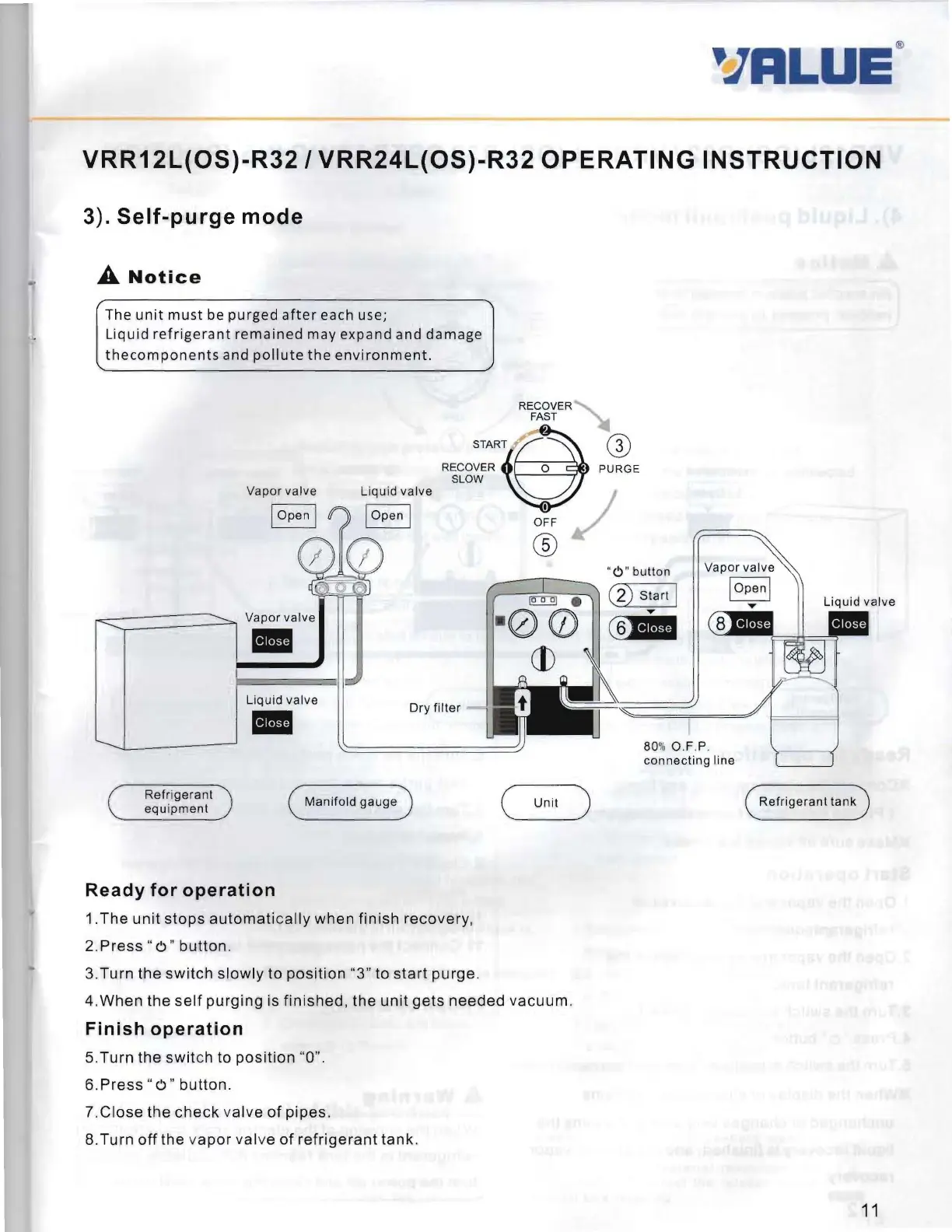
RECOVER
FAST
START
S@
RECOVER 0 PURGE
SLOW
,
OFF
"
0"
button
~
.
(2)
Start
I
Vapor
valve
00
C§liI
--....--
-1.
®
~
Dry f
ilter
Liquid
valve
80%o.r.s.
con necting line
Refrigerant
(
Manifold
gauge
)
( Unit )
Refrig
erant
tank
equ
ipment
Ready
for
operation
1
.The
unit
stops
automatically
when
finish
recovery,
2
.Press
" 0 "
button
.
3.Turn
the
switch
slowly
to
position
"3" to
start
purge.
4
.When
the
self
purging
is
finished
,
the
unit
gets
needed
vacuum.
Finish
operation
5.Turn
the
swit
ch to
position
"0".
6
.Press"
0"
button.
7.Close
the
check
valve
of
pipes
.
8.
Turn
off
the
vapor
valve
of
refrigerant
tank.
11

Related product manuals