EasyManua.ls Logo

Valueline VLS-DVBT-FTA1 - User Manual

Valueline VLS-DVBT-FTA1
140 pages
Print Icon
To Next Page IconTo Next Page
Loading...
VLS-DVBT-FTA1
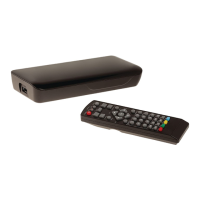
Digital set-top box
USER MANUAL (EN)
GEBRUIKSAANWIJZING (NL)
BEDIENUNGSANLEITUNG (DE)
MANUAL DE USUARIO (ES)
MANUEL DE L’UTILISATEUR (FR)
MANUAL DO UTILIZADOR (PT)
BRUGSVEJLEDNING (DA)
BRUKSANVISNING (SV)
YTTÖOPAS (FI)
ΕΓΧΕΙΡΙΔΙΟ XPHΣHΣ (EL)
INSTRUKCJA OBSŁUGI (PL)
VOD K POUŽITÍ (CS)
VOD NA POUŽITIE (SK)
HASZNÁLATI ÚTMUTATÓ (HU)
MANUAL DE UTILIZARE (RO)

Table of Contents

Questions and Answers

  • A
    Angela MartinAug 10, 2025
    Why is there no sound on my Valueline Set-top box?
    • J
      Joe GriffithAug 10, 2025
      If there is no sound on your Valueline Set-top box, it could be due to a few reasons: the audio cable might not be connected correctly (connect the audio cable correctly), the sound might be muted (unmute the sound), or the device might be playing an incorrect sound track (change the sound track).
  • B
    Bob SmithAug 16, 2025
    What to do if my Valueline Set-top box remote control does not work?
    • P
      Patricia FisherAug 16, 2025
      If the remote control for your Valueline Set-top box isn't working, try these steps: First, the batteries may be low, so replace them. Second, make sure you are pointing the remote control directly at the device and that nothing is blocking the front panel.
  • B
    Bryan BowersAug 22, 2025
    Why is there no picture on my Valueline Set-top box?
    • R
      Rhonda PerezAug 22, 2025
      If you are not getting a picture on your Valueline Set-top box, check if the mains plug is properly inserted into the wall socket. Also, make sure that the device is switched on.
  • P
    Paul WilsonAug 28, 2025
    What to do if my Valueline Set-top box screen shows 'No Signal'?
    • J
      Jon DiazAug 28, 2025
      If your Valueline Set-top box displays a 'No Signal' message, ensure the antenna cable is securely connected. Also, verify that your settings are correct and change them if needed.
  • E
    Eric RodriguezSep 3, 2025
    How to fix mosaic image on Valueline Set-top boxes?
    • L
      Linda HernandezSep 3, 2025
      If the image on your Valueline Set-top box is stopping or appears as a mosaic, the signal might be too weak. Try to strengthen the signal.

Summary

Digital Set-Top Box Features

Package Contents

Lists the items included with the digital set-top box.

Device Components and Connections

Details the front, side, and rear panels, plus the connection scheme for the set-top box.

Remote Control Operation

Button Functions Overview

Explains the function of each button on the remote control for operating the set-top box.

Product Usage and Setup

Installing Batteries

Instructions for inserting batteries into the remote control.

Initial Setup and Channel Scanning

Guides the user through the first-time installation, language/country selection, and automatic channel search.

Programme Guide and Channel Search

Electronic Programme Guide (EPG)

Explains how to use the EPG to view scheduled TV and radio programs.

Channel Sorting and Searching

Details how to sort channels by LCN, name, and perform auto/manual searches.

Device Settings

Picture, Time, and Option Settings

Covers adjustments for picture, time, language, and audio preferences.

System Settings

Parental Controls and System Info

Manages parental guidance, password settings, factory reset, and device information.

USB Media Playback

Multimedia File Playback and Configuration

Details playing music, photos, movies, and configuring PVR recording via USB.

Troubleshooting Guide

Common Problems and Solutions

Provides solutions for common issues like no sound, no picture, remote control not working, and signal problems.

Safety and Product Information

Safety Precautions

Outlines essential safety guidelines for using the device, power, and batteries.

Warranty, Disposal, and Documentation

Covers product warranty, proper disposal methods, and available documentation.

Disclaimer

States that designs and specifications are subject to change without notice.

Valueline VLS-DVBT-FTA1 Specifications

General IconGeneral
Free To AirYes
EPGYes
TunerDVB-T
InputAntenna
Video OutputComposite Video
Audio OutputRCA
Resolution576i
Power Supply12V DC
FeaturesParental Control

Related product manuals