Tel. +44(0)1757 701177, Fax +44(0)1757 706011, E-mail: sales@vanosmedical.com, www.vanosmedical.com
6
7
1. IDENTIFICATION
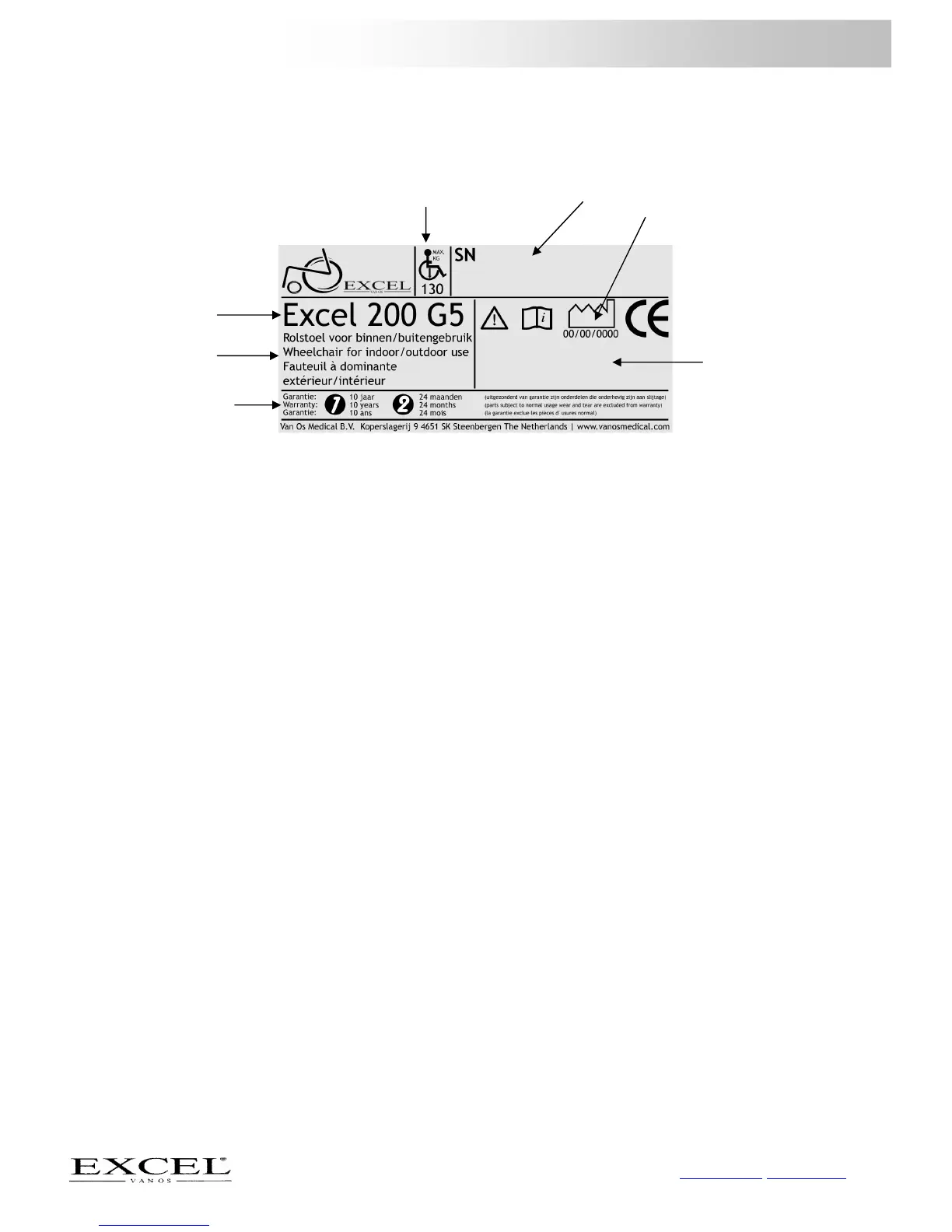
Your wheelchair is equipped with a unique identification number. You can find this number on the cross frame of
your wheelchair. Below is an example of the frame label on which you can find the identification number.
Furthermore you will find the explanation of the various data stored on the frame label listed below.
1. Production date The date on which your wheelchair was manufactured.
2. Serial number Every wheelchair has its own unique identification number. YOU must have this
number when making technical requests or if warranty parts are required.
3. Maximum user weight The largest occupant weight allowed for protection of both the wheelchair and the
user.
4. Type number This number indicates which model of wheelchair you have, again this is always
required when making technical calls.
5. Model name The model name of your wheelchair starts with the brand name Excel. The brand
name Excel is followed by an additional model description that forms the model
name of your wheelchair.
6. Usage application Where you can use your wheelchair.
7. Warranty Here the guarantee period of your wheelchair is reflected. Chapter 9 describes your
warranty terms and conditions in more detail.
1
2 3
4
5



 To Next Page