Other Setting
About
1. Power On Option
Ifyou select Direct, the projector will directly poweron when you plug
its power cord into an electrical outlet for the next use.
* IfyouselectStandby,youneedtopress@toturntheprojectoron
when you plug its power cord into an electricaloutlet for the next use.
2. Scheduled Shutdown
Set the time duration for the projector to shut down automatically.
Options include Off, 10min, 20min, 30min, 60min and 120min.
Check the System Version and MACAddress of the projector.
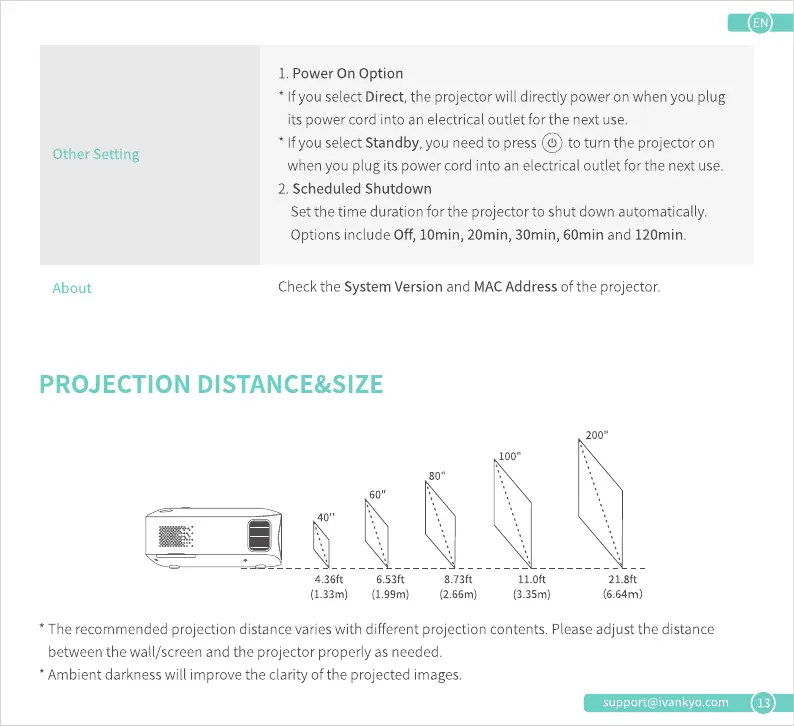
PROJECTION DISTANCE&SIZE
40"
4.36ft
(1.33m)
60"
6.53ft
(1.99m)
8.73ft
(2.66m)
100"
11.0ft
(3.35m)
200"
21.8ft
(6.64m)
* The recommended projection distance varies with different projection contents. Please adjust the distance
between the wall/screen and the projector properly as needed.
Ambient darknesswill improve the clarity of the projected images.
support@ivankyo.com
13











 To Next Page