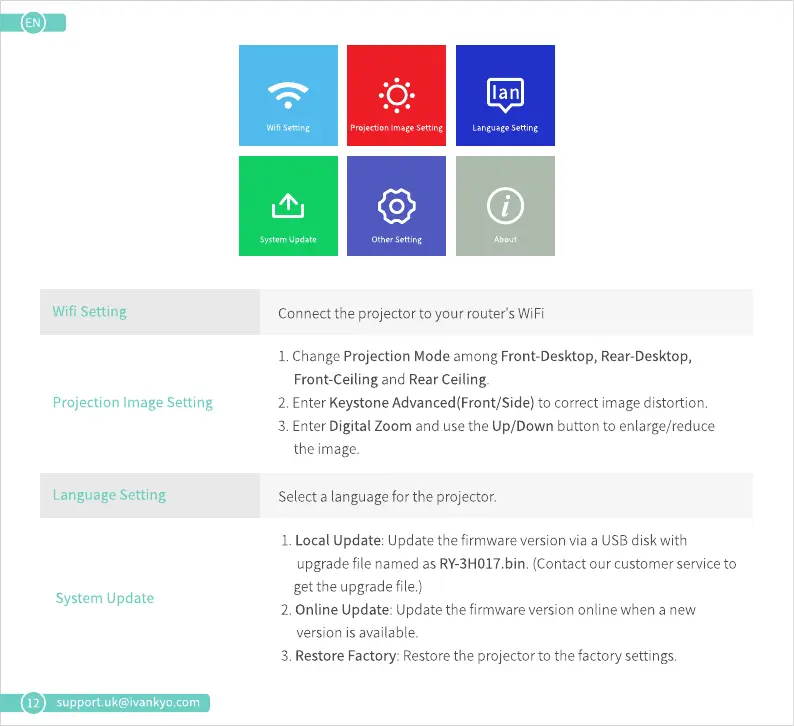
Wifi Setting
System Update
Projection Image Setting
Other Setting
Ian
Language Setting
About
12
Wifi Setting
Projection Image Setting
Language Setting
System Update
support.uk@ivankyo.com
Connect the projector to your router's WiFi
1.ChangeProjection Mode among Front-Desktop,Rear-Desktop,
Front-ceiling and Rear Ceiling.
2. EnterKeystoneAdvanced(Front/Side)to correct imagedistortion.
3. Enter Digital Zoom and use the Up/Down button to enlarge/reduce
the image.
Select a language for the projector.
I. Local Update: Update the firmware version via a USBdisk with
upgradefile namedas RY-3H017.bin.(Contactour customerserviceto
get the upgrade file.)
2. Online Update: Update the firmware version online when a new
version is available.
3. Restore Factory: Restore the projector to the factory settings.













 To Next Page