05
MULTIMEDIA CONNECTION
USB Disk/Memory Card Connection
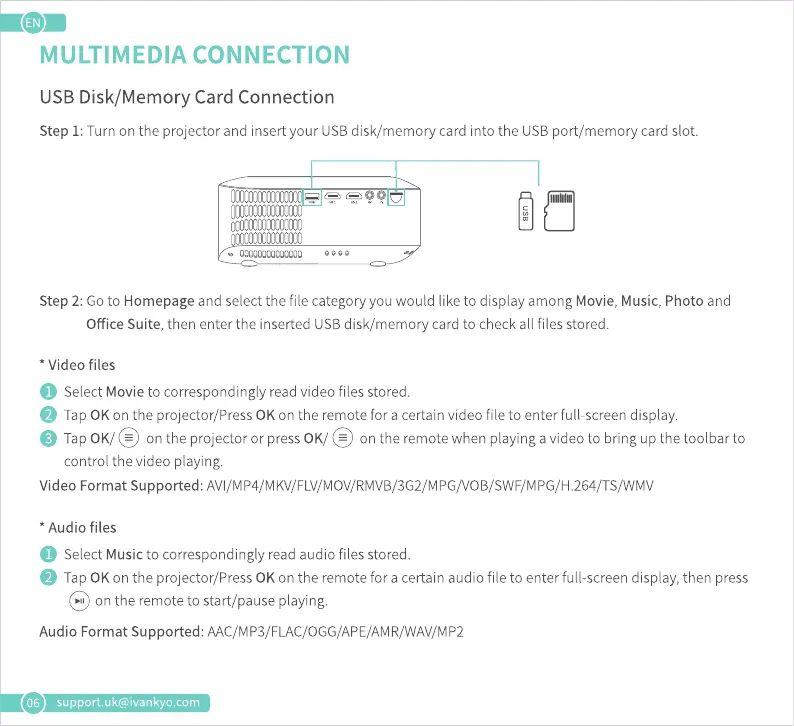
Step 1: Turn on the projector and insert your USB disk/memory card into the USB port/memory card slot.
Step 2: Go to Homepage and select the file category you would like to display among Movie, Music, Photo and
Office Suite, then enter the inserted USB disk/memory card to check all files stored.
* Video files
O SelectMovieto correspondinglyreadvideofilesstored.
O Tap0K ontheprojector/Press0K ontheremoteforacertainvideofileto enterfull-screendisplay.
O Tap 0K/@ ontheprojectororpress0K/@ ontheremotewhenplayingavideotobringupthetoolbarto
control the video playing.
Video Format Supported: AVI/MP4/MKV/FLV/MOV/RMVB/3G2/MPG/VOB/SWF/MPG/H.264/TS/WMV
* Audio files
O SelectMusicto correspondinglyreadaudiofilesstored.
O Tap0K ontheprojector/Press0K ontheremotefor acertainaudiofileto enterfull-screendisplay,then press
@on theremotetostart/pauseplaying.
Audio Format Supported: AAC/MP3/FLAC/OGG/APE/AMR/WAV/MP2
support.uk@ivankyo.com











 To Next Page