* Photo files
O SelectPhototo correspondinglyreadphotofilesstored.
O Tap0K onthe projector/Press0K ontheremotefor acertainphotofileto enterfull-screendisplay.
Image Format Supported: JPEG/BMP/PNG
* Document files
O SelectOfficeSuiteto correspondinglyreaddocumentfilesstored.
O Tap0K onthe projector/Press0K ontheremotetoviewcontentsofacertainfile.
O Tap@ontheprojectororpress@ontheremotetojumpthecursortothetoolbaratthetop.
Text Format Supported: DOC/DOCX/XLS/XLSX/PPT/PPTX/TXT
Step 3:Tap@ontheprojectororpress theremotetogobacktoHomepage.
HD Connection
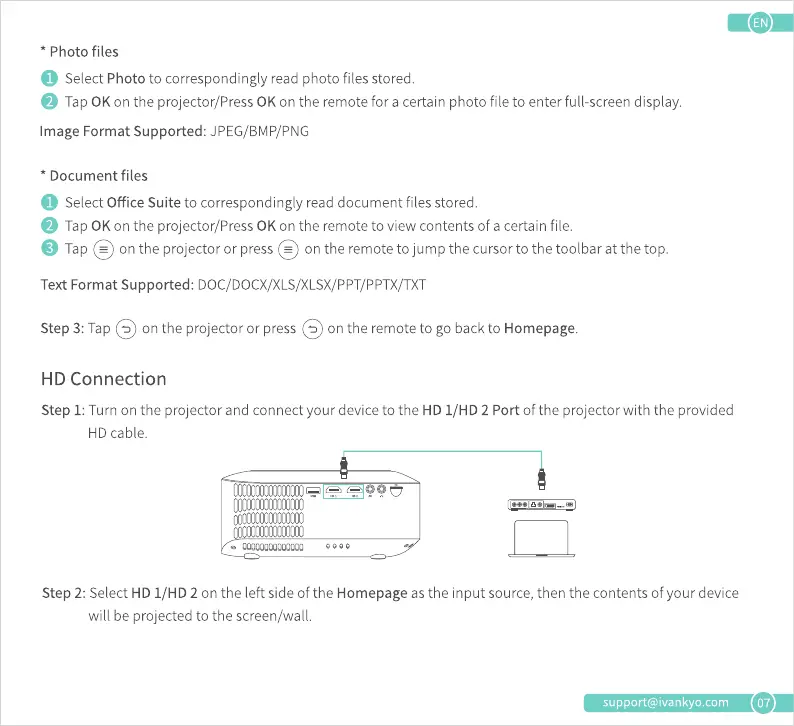
Step 1:Turn on the projector and connect your deviceto the HD I/HD 2 Port of the projector with the provided
HD cable.
0000
Step 2: Select HD I/HD 2 on the left side of the Homepage as the input source, then the contents of your device
will be projected to the screen/wall.
support@ivankyo.com
07











 To Next Page