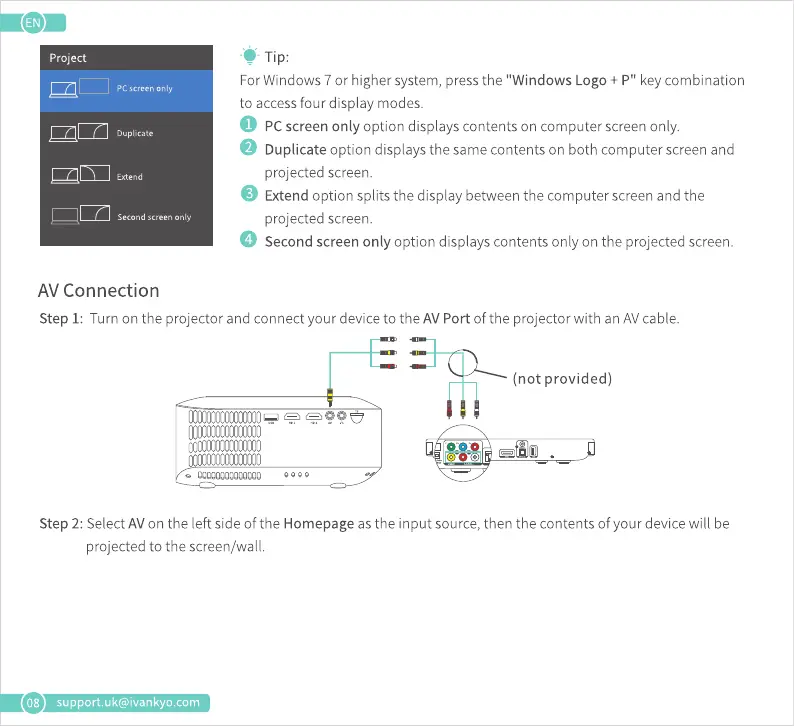
Project
PCscreen Only
Duplicate
Extend
Second screen only
AV Connection
-e Tip:
ForWindows7 or highersystem,pressthe "Windows Logo + P" keycombination
to access four display modes.
O PCscreenonlyoptiondisplayscontentsoncomputerscreenonly.
O Duplicateoptiondisplaysthesamecontentsonbothcomputerscreenand
projected screen.
O Extendoptionsplitsthedisplaybetweenthecomputerscreenandthe
projected screen.
o
Second screen only option displays contents only on the projected screen.
08
Step I: Turn on the projector and connect your device to the AV Port of the projector with an AVcable.
(not provided)
Step 2: Select AVon the left side of the Homepage as the input source, then the contents of your device will be
projected to the screen/wall
support.uk@ivankyo.com















 To Next Page