○○○○○○○○○○○○○
7
○○○○○○○○○○○○○○○○○○○○○○○○○○○○○○○○○○○○○○○○○○○○○○○○○○○○○○○○○○○○○○○○○○○○○○○○○○○○○○○○○○○
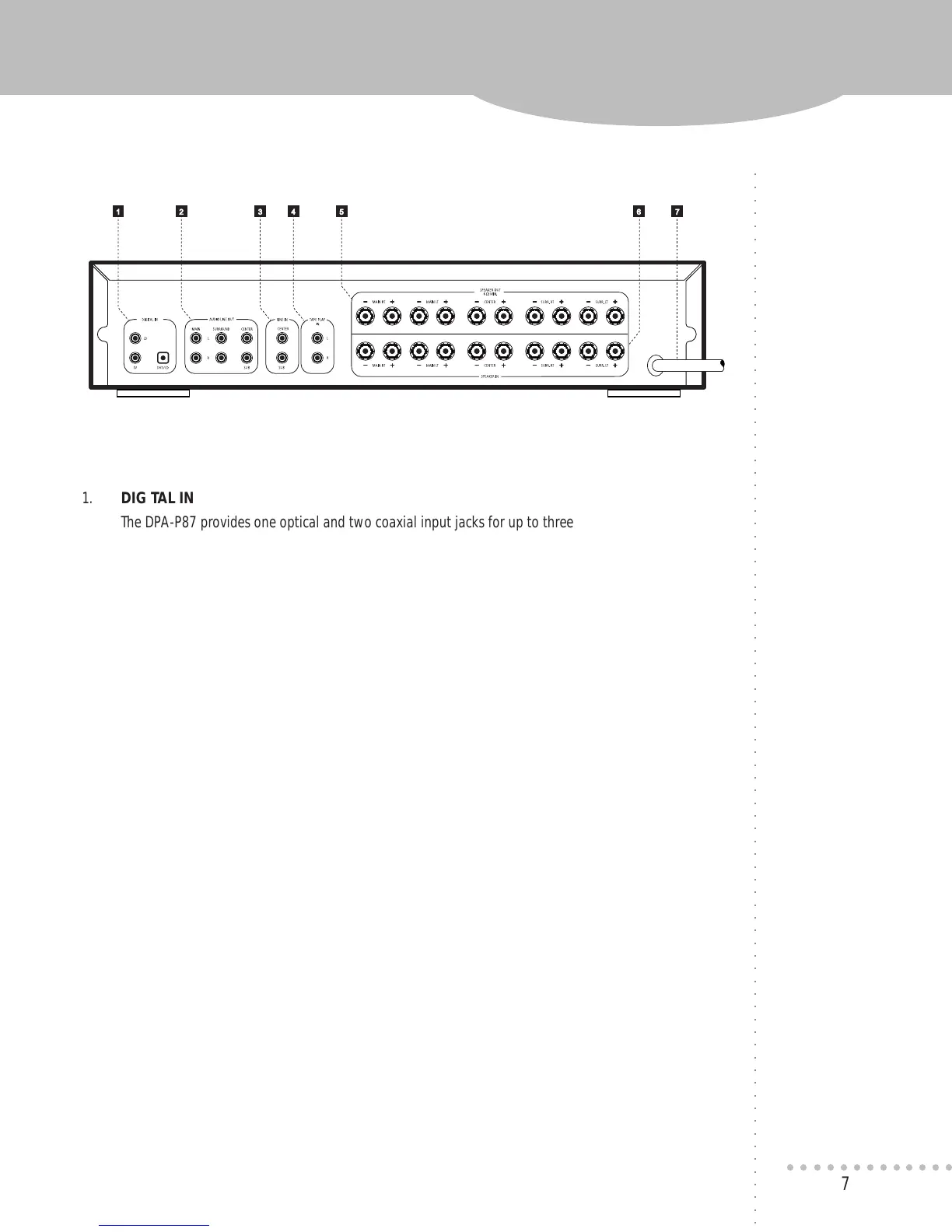
1 2 3 4 5 6 7
1. DIGITAL IN
The DPA-P87 provides one optical and two coaxial input jacks for up to three separate digital sources
such as DVD/CD, Laserdisc and TV (HDTV). The inputs have been marked for your convenience, but
they can be used for any digital audio source.
2. AUDIO LINE OUT
The MAIN-AUDIO LINE OUT jacks are integral for interfacing the DPA-P87 with any Pro Logic
receiver/integrated amp. All six AUDIO LINE OUT connections are primarily used for interfacing
the DPA-P87 with “5.1 Ready” A/V receiver/integrated amp.
3. LINE IN
The center and sub audio signals from a receiver/integrated amp are connected to the CENTER
and SUB-LINE IN jacks on the rear panel of the DPA-P87. These LINE IN signals are then passed
through to the DPA-P87’s corresponding AUDIO LINE OUT when unit is in bypass mode
(no digital signal).
4. TAPE PLAY IN
When the tape play in jacks on a receiver/integrated amp are used to hook-up the DPA-P87,
a duplicate set of TAPE PLAY IN jacks are provided for reconnecting a cassette deck.
Connect the tape play out jacks of the cassette deck to the TAPE PLAY IN jacks on the DPA-P87.
The TAPE PLAY IN signals are passed through to the MAIN-AUDIO LINE OUT when the DPA-P87
is in bypass mode allowing the receiver/intergrated amp to monitor the cassette deck.
For detailed information on the use of these connections in a system setup, refer to the section titled System Connections.
REAR PANEL CONNECTIONS
QUICK FACTS
To connect a Laserdisc
player for Dolby Digital
playback, you must use
the player’s AC-3 RF
output jack and connect
it to an RF demodulator
before connecting it
to a DIGITAL IN on the
DPA-P87.


 To Next Page