Công Ty Cổ Phần Thương Mại Vạn Xuân . www.vantech.com.vn
189A Lý Thường Kiệt – P.7 – Q.11 – Tp.HCM Tell : (08)3.955.9999 – Fax : (08) 5.405.13.78
*PTZ communication protocols from different brands aren’t compatible 100% some times.
Therefore, some of these functions may be unavailable :
Đôi khi những giao thức truyền thông PTZ từ những
nhãn hiệu khác không thích hợp 100% . Bởi vậy, một số những chức năng này có thể không có sẵn .
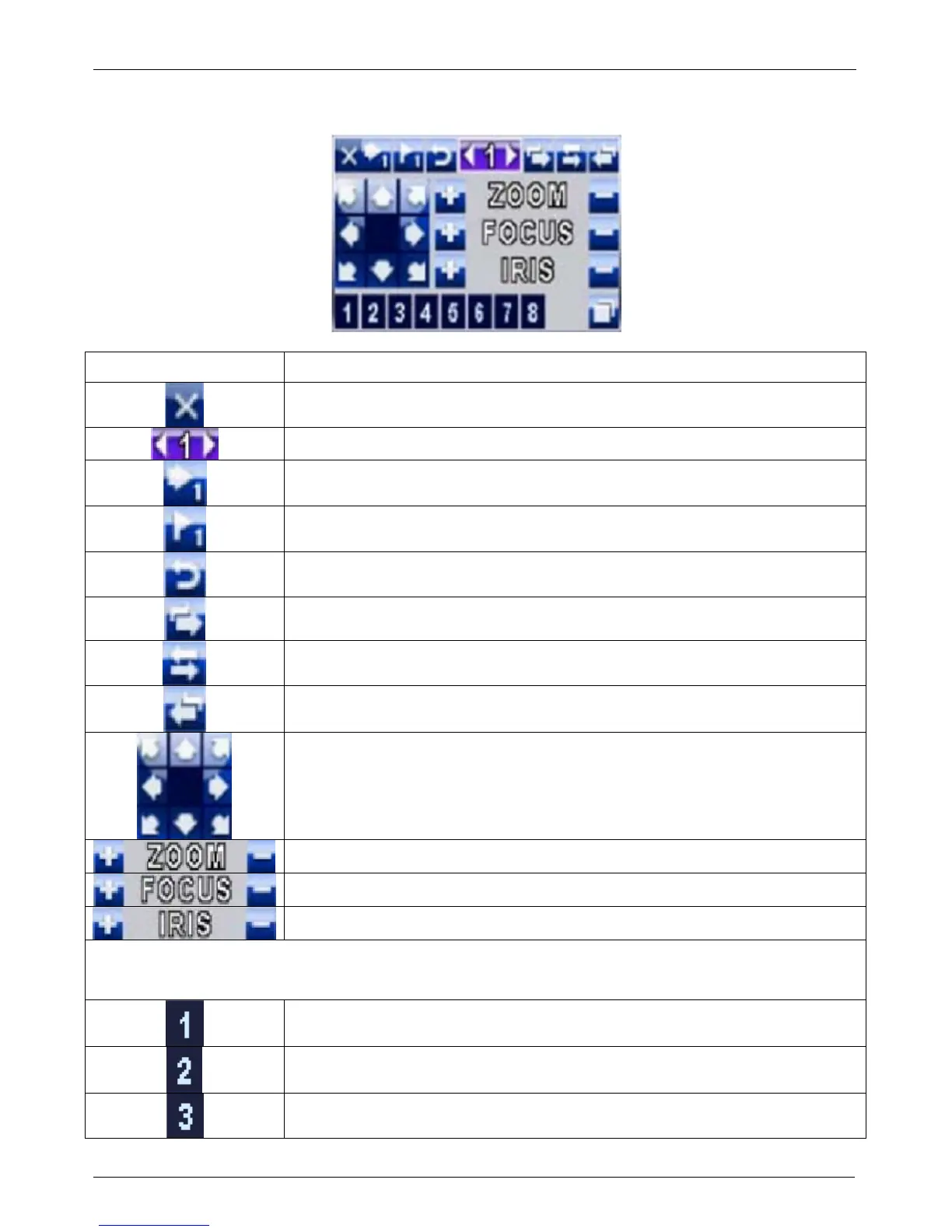
Table 3-3.2 Mouse operation under the PTZ mode : Thao tác chuột theo kiểu điều khiển PTZ
Icon Description : Mô tả
Leave PTZ Mode,back to the LIVE mode : Tắt bỏ chế độ PTZ , quay trở lại
ch
ế độ hiển thị
Pre-set number N. (1~64) : Sét vị trí số thứ tự (1~64)
Go to pre-set number N : Di chuyển tới vị trí đã sét
Set current PTZ location at pre-set number N : Thiết lập vị trí hiện tại theo số
thứ tự
「TOUR」 ,press to activate pre-set tour : Kích hoạt tuần tra điểm đã thiết
l
ập sẵn
「PIP」 ,Set current PTZ location as the start
of line-scan :
Thiết lập vị bắt đầu hiện tại của dòng PTZ
「FREEZE」 , Activate line-scan : Kích hoạt chế độ quét
「ZOOM」 ,Set current PTZ location as the end
of line-scan :
Thiết lập vị cuối hiện tại của dòng PTZ
To move PTZ in 360° : Di chuyển PTZ 360°
PTZ zoom in; PTZ zoom out
PTZ focus in; PTZ focus out.
PTZ IRIS open, PTZ IRIS close.
Below functions need support from specific PTZ manufacturer. Please check user manual of your
PTZ for more detail :
Dưới đây chức năng PTZ cần hỗ trợ từ nhà sản xuất . Hãy kiểm tra hướng dẫn sử dụng của
PTZ của bạn để biết thêm chi tiết
AUX 1,「AUTO」Key + Number key「1」
AUX 2,「AUTO」Key + Number key「2」
AUX 3,「AUTO」Key + Number key「3」


 To Next Page