Công Ty Cổ Phần Thương Mại Vạn Xuân . www.vantech.com.vn
189A Lý Thường Kiệt – P.7 – Q.11 – Tp.HCM Tell : (08)3.955.9999 – Fax : (08) 5.405.13.78
Item
Description :
Mô tả
Mask Mouse
Selection
Switch between “select” and “deselect” for cursor-dragging function :
Chuyển đổi
giữa "chọn" và bỏ chọn "" cho chức năng con trỏ
All Area
Detection
Select entire screen as detection area :
Chọn toàn bộ màn hình cho vùng dò tìm
Mask All Area Deselect entire detection area : Kiểm tra vùng chọn
Continue Continue setup : Tiếp tục cài đặt
Exit & Save Save setup and leave : Lưu lại cài đặt
Exit & Discard Cancel setup and leave : Huỷ bỏ cài đặt
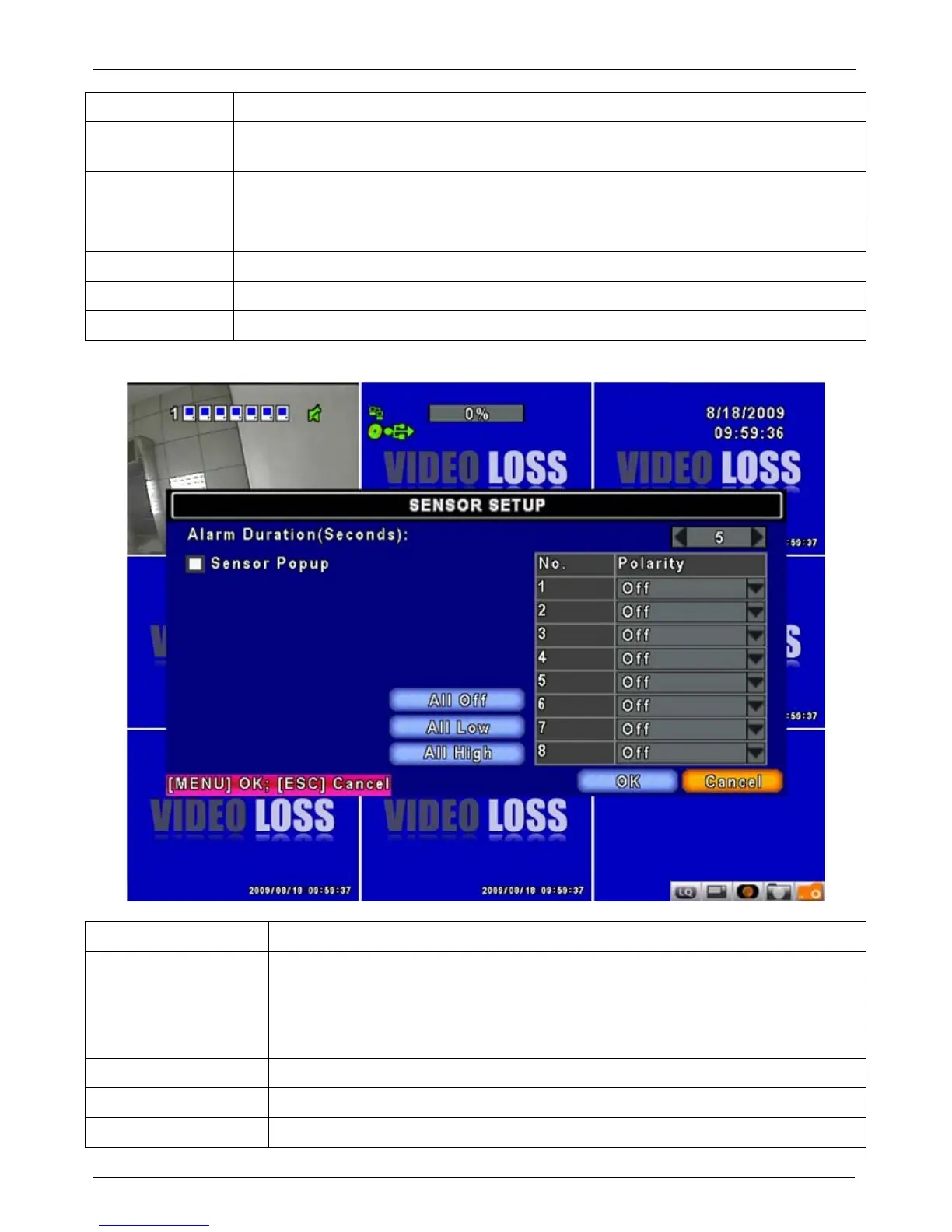
4-2.2 SENSOR SETUP : Cài đặt cảm biến
Item Description : Mô tả
Sensor Popup
Check the box to Enable/Disable popup screen function for all channels.
When Sensor is detected in LIVE mode, the detected channel image will pop
up in full screen display :
Chọn vào ô để Kích hoạt / Vô hiệu hoá chức năng màn hình
popup cho t
ất cả các kênh. Khi cảm biến được phát hiện trong chế độ hiển thị , hình ảnh
kênh phát hiện sẽ bật lên trong màn hình hiển thị đầy đủ.
All Off Set all sensor off : Tắt tất cả các cảm biến
All Low Set all sensor polarity low : Đặt tất cả các cảm biến thấp
All High Set all sensor polarity high : Đặt tất cả các cảm biến cao


 To Next Page