Công Ty Cổ Phần Thương Mại Vạn Xuân . www.vantech.com.vn
189A Lý Thường Kiệt – P.7 – Q.11 – Tp.HCM Tell : (08)3.955.9999 – Fax : (08) 5.405.13.78
Item Description : Mô tả
Enable E-mail
Notification
Check the box to enable/disable Email Notification function :
Đánh dấu vào ô
Enable/disable ch
ức năng Thông báo qua Email
SMTP Server Enter to set up SMTP Serve name : Chọn vào để cài đặt tên của máy chủ SMTP
User Name Enter to set up User Name : Chọn để cài đặt tên người dùng
Password Enter to set up Password : Chọn để cài đặt mật khẩu
Sender E-mail
Enter to set up e-mail address of receivers :
Chọn để thiết lập địa chỉ Email người
nh
ận
Receiver E-mail
Enter to set up e-mail addresses for up to 10 receivers individually :
Chọn vào để
thiết lập địa chỉ e-mail cho đến 10 thiết bị thu riêng
Trigger Event
Enter to select events to send out E-mail notifications when below circumstances
happen: Motion, Sensor and Vloss (Video Loss) :
Bấm vào để chọn sự kiện gửi e-mail
thông báo khi
có những trường hợp xảy ra: Chuyển động, cảm biến và Vloss (Video Loss).
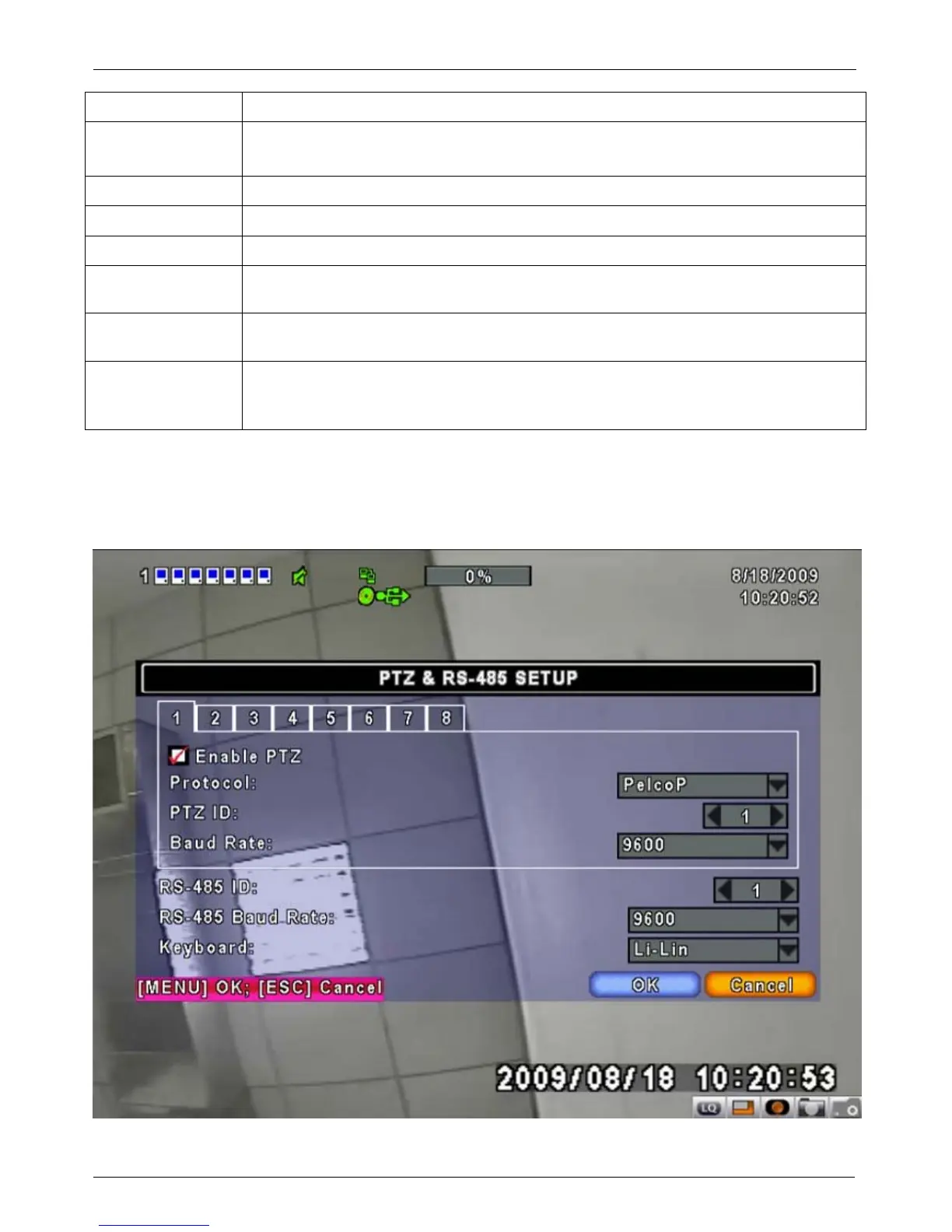
4-7 PTZ & RS485 SETUP : Cài đặt PTZ & RS485
The DVR allows users to control PTZ functions of your camera. To enable PTZ function, the 485
cable should be connected to the RS-485 port of DVR :
DVR cho phép người dùng sử dụng chức năng điều
khiển PTZ Camera của bạn. Để kích hoạt chức năng PTZ, cáp 485 nên được kết nối với cổng RS-485 của DVR


 To Next Page