Công Ty Cổ Phần Thương Mại Vạn Xuân . www.vantech.com.vn
189A Lý Thường Kiệt – P.7 – Q.11 – Tp.HCM Tell : (08)3.955.9999 – Fax : (08) 5.405.13.78
AP software:「DVR Remote Desktop」can allow you to remotely access and control the DVR from
PC :
Phần mềm AP : "DVR Remote Desktop" có thể cho phép bạn truy cập từ xa và kiểm soát việc ghi hình từ máy
PC
5-3 AP Software Installation and Setup : Thiết lập và cài đặt phần mềm AP
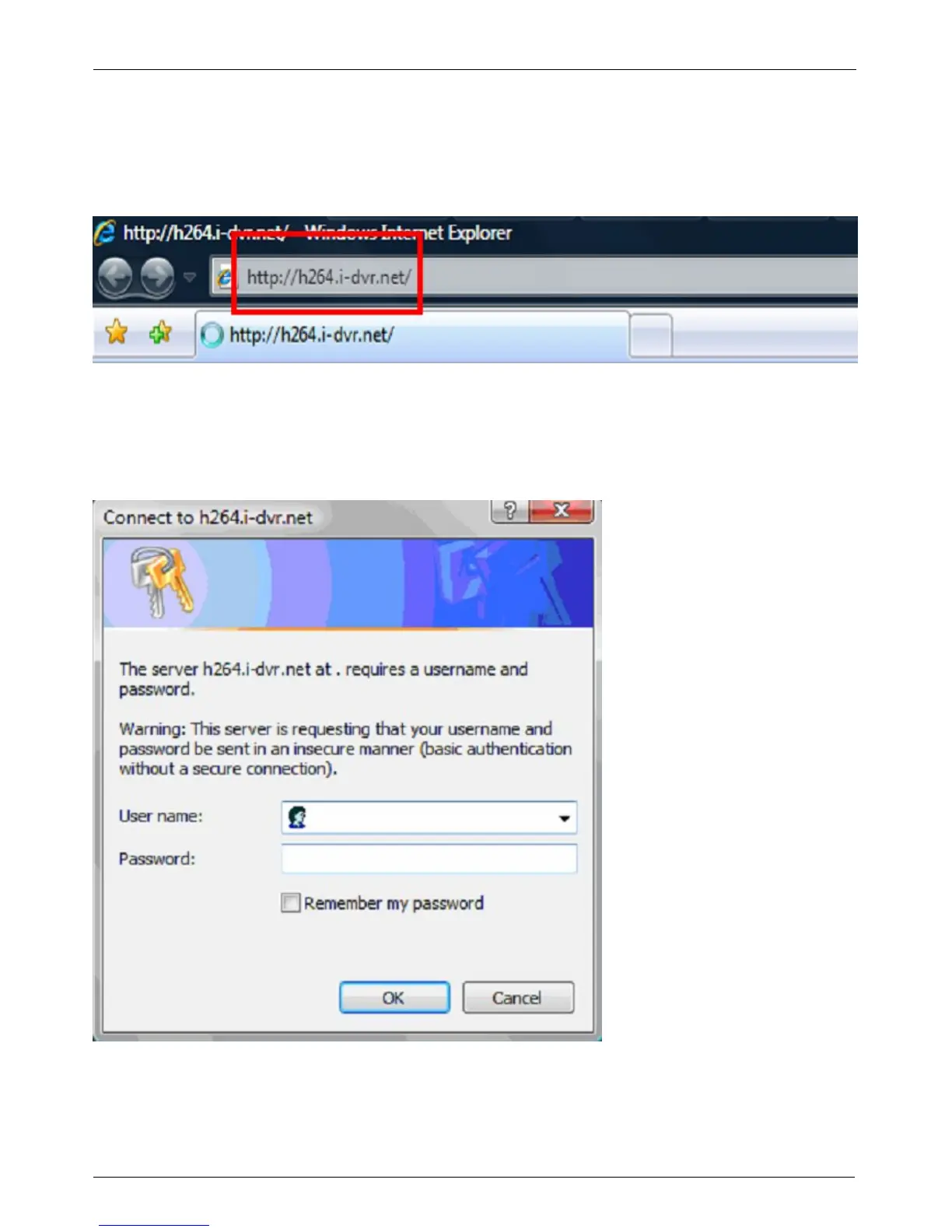
Step One:Enter the IP address of DVR in IE browser : Nhập địa chỉ IP của DVR trong trình duyệt IE
Step Two: Windows as below will show up. Please enter the user name and password. Default user
name and password is admin/123456. Other related setup about user account and password, please
check “4-5 Account Setup :
Windows như dưới đây sẽ hiển thị. Hãy nhập tên người dùng và mật khẩu. Mặc định
người d
ùng tên và mật khẩu là admin/123456. Thiết lập khác về tài khoản người dùng và mật khẩu, xin vui lòng kiểm
tra mục "4-5” Thiết lập tài khoản
Step Three: Click on the link to start downloading the AP software : Nhấn vào liên kết để bắt đầu tải về
phầnmềmAP.


 To Next Page