Công Ty Cổ Phần Thương Mại Vạn Xuân . www.vantech.com.vn
189A Lý Thường Kiệt – P.7 – Q.11 – Tp.HCM Tell : (08)3.955.9999 – Fax : (08) 5.405.13.78
8-2 CMS LOGIN AND ENVIRONMENT : Đăng nhập CMS
To enter CMS, the administrator’s user name and password are required. The defaults are ‘admin’
and ‘123456’ :
Để nhập CMS, tên người dùng của quản trị và mật khẩu được yêu cầu. Giá trị mặc
định là 'admin' và '123456 '
,
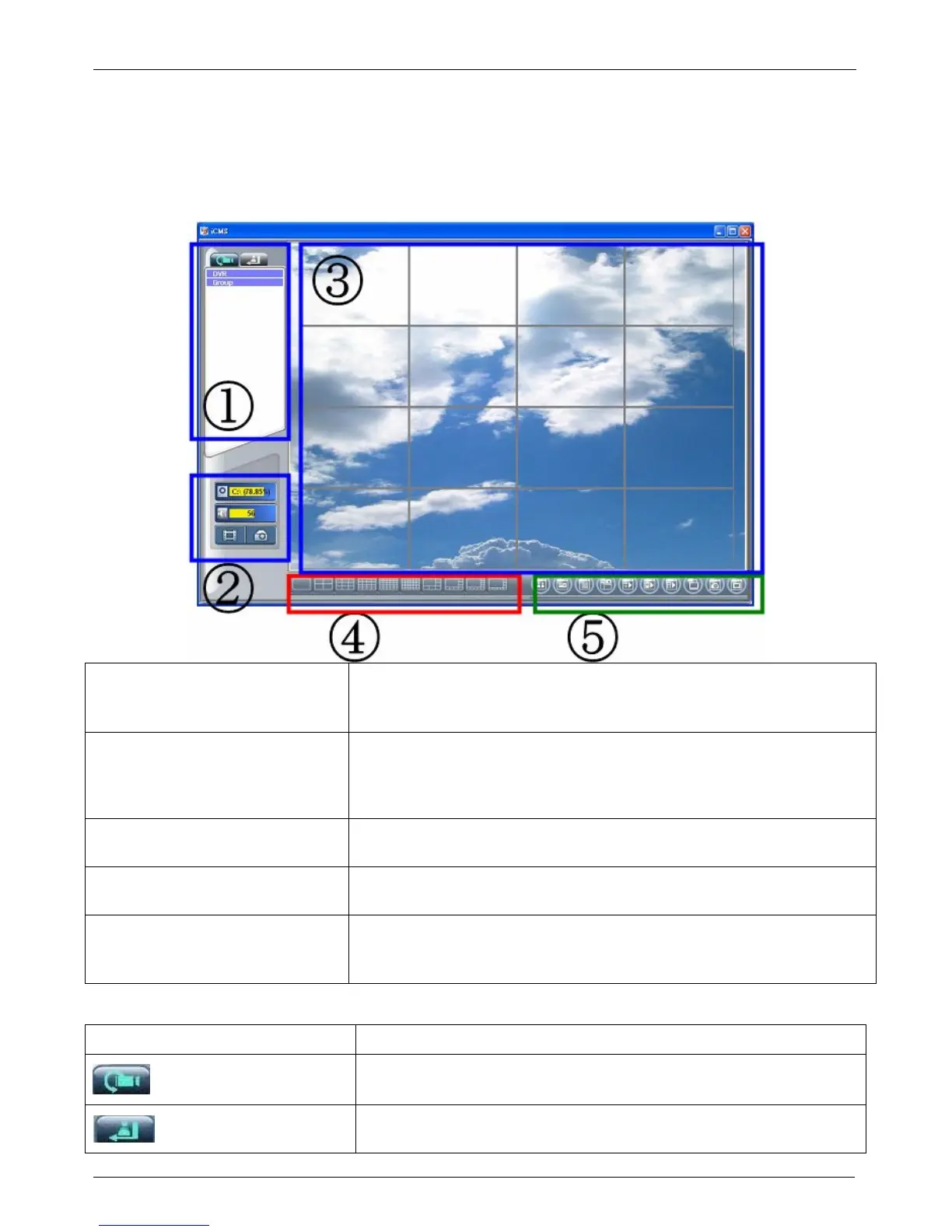
After successful login, the following image shows on your screen :
Sau khi đăng nhập thành công,
hình ảnh sau đây sẽ hiển thị trên màn hình của bạn
① DVRs, Groups & Events
Information about DVRs, groups and events. See “9-3 Information
List” for more detail :
Thông tin về DVRs, các nhóm và các sự kiện. Xem
"Danh sách thông tin 9-3 " để biết thêm chi tiết
② PC information and control
Information about local PC’s hard disk, volume, recording...etc. See
“9-4 PC Information and Control” for more detail :
Thông tin về của
đĩa cứng
máy tính, khối lượng, , recording...etc . Xem "9-4 PC Information and
Control
" để biết thêm chi tiết
③ Main Display
Live image display area. See “9-5 Main Display” for detail
: Khu vực
hình ảnh hiển thị. Xem phần “9-5 Main Display” để xem chi tiết
④ Display Modes
Several choices of display modes supported by CMS :
Một vài sự lựa
chọn của các chế độ hiển thị được hỗ trợ bởi CMS
⑤ Operation Bar
A set of 10 operations are provided by CMS. See “ 9-6 Operation
Bar” for detail :
10 hoạt động được cung cấp bởi CMS. Xem “ 9-6
Operation Bar”
để xem chi tiết
8-3 DVRs, Groups & Events
Icon
Description :
Mô tả
View list of logged in DVR/ Group : Xem danh sách đăng nhập DVR
/ Nhóm.
View Logs: list all the event information of DVR : Danh sách tất cả
các thông tin sự kiện của DVR


 To Next Page