Công Ty Cổ Phần Thương Mại Vạn Xuân . www.vantech.com.vn
189A Lý Thường Kiệt – P.7 – Q.11 – Tp.HCM Tell : (08)3.955.9999 – Fax : (08) 5.405.13.78
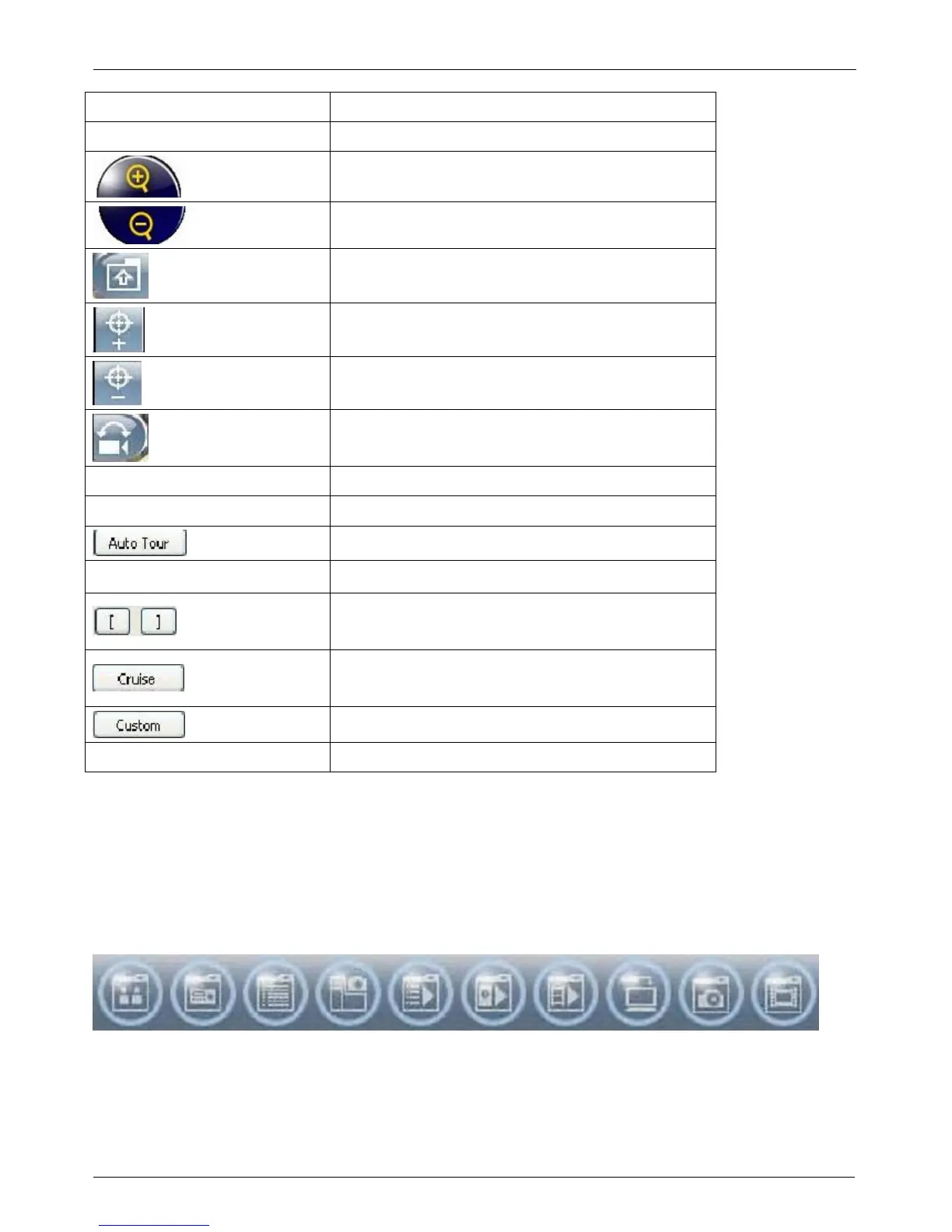
Icon Description
8 direction key Rotate the PTZ
ZOOM+:Zoom in
ZOOM : Zoom out
Setup the PTZ spot as pre-set N.
FOCUS+ : Focus in
FOCUS-:Focus out
Move to pre-set N.
Set PTZ Preset Setup 16 pre-set N.
Goto PTZ Preset Move to specific pre-set N.
Activate auto pre-set tour*
PTZ Sensitivity
Setup PTZ sensitivity
*
Setup the “start” and “end” of
liner scan.
*
Activate the liner scan cruise.
*
Customization function
AUX 1~8 (For customization) AUTO+1 ~ AUTO+8
*PTZ communication protocols from different brands aren’t compatible 100% sometimes.
Therefore, some of these functions may be unavailable :
PTZ giao thức truyền thông của các nhãn hiệu khác
nhau đôi khi không tương thích 100%. V
ì vậy, một số các chức năng này có thể không có
8-6 Operation Bar
10 Operations to be listed as below:
Table 9-6.1 description of 10 operations:


 To Next Page