EasyManua.ls Logo

Vari Task Chair - User Manual

Vari Task Chair
8 pages
Print Icon
To Next Page IconTo Next Page
Loading...
Patent and trademark informaon: vari.com/patents | ©2021 Varidesk, LLC All rights reserved.
Task Chair
Question and Answer IconNeed help?

Do you have a question about the Vari Task Chair and is the answer not in the manual?

Summary

Task Chair Assembly

Chair Components

Lists essential parts for chair assembly: back, seat, base, piston, Allen key, and hex bolts.

Assembly Instructions

Attach Chair Back to Seat

Align chair back with seat plate and secure using provided bolts and Allen key.

Insert Piston into Base

Insert the air piston into the chair base with the larger end oriented downwards.

Attach Seat Assembly to Base

Align seat with piston, lower carefully, and press firmly to ensure secure connection.

Task Chair Adjustments

Arm Adjustments

Adjust arm angle or slide arms forward/backward by pushing them accordingly.

Backrest Recline Tension

Modify backrest recline tension by turning the knob forward (increase) or backward (decrease).

Seat Height Adjustment

Operate the lever under the right side of the chair seat to adjust its height.

Arm Height Adjustment

Adjust arm height by pressing the button under the armrest and moving it up or down.

Backrest Recline Lock

Use the knob on the left side to unlock or lock the backrest for reclining.

Seat Position Adjustment

Adjust seat position forward or backward using the lever on the left side.

Safety Warnings

General Usage Precautions

Avoid standing, climbing, or leaning on the chair; do not use if damaged or incorrectly assembled.

Overview

This document provides assembly instructions and usage features for the Vari Task Chair.

Function Description:

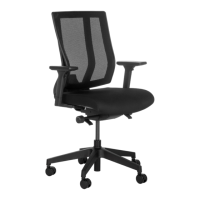
The Vari Task Chair is an office chair designed for comfortable and adjustable seating. It features a mesh backrest, a cushioned seat, and a five-star base with casters for mobility. The chair is designed to support a single user for various tasks, offering multiple adjustment options to customize the seating experience.

Important Technical Specifications:

  • Weight Capacity: Holds up to 300 lb (136 kg).
  • Assembly: Requires 2 people for recommended assembly.
  • Components:
    • Chair Back (x1)
    • Chair Seat (x1)
    • Air Piston (x1)
    • Base (x1)
    • Allen Key (x1)
    • Hex Bolt (x4)

Usage Features:

Assembly:

  1. Preparation: Remove all components (chair back, chair seat, hex bolts, Allen key, air piston, and base) from the box.
  2. Attach Chair Back to Seat: Align the back of the chair with the steel plate attached to the seat. Use the four provided hex bolts and the Allen key to fasten the plate securely to the back of the chair.
  3. Insert Air Piston into Base: Insert the air piston into the center of the chair base, ensuring the large end of the piston is facing down.
  4. Attach Seat Assembly to Piston: If the piston has a protective cap, remove it before proceeding. Carefully align the hole underneath the chair seat with the top of the air piston and base assembly. With the assistance of another person, gently lower the chair back and seat assembly onto the piston. Apply even pressure and press down firmly on the seat cushion a few times to ensure the seat is fully engaged with the piston.
    • CAUTION: Once the chair is assembled, do not attempt to disassemble it, as this could damage the product.

Adjustments:

The Vari Task Chair offers several adjustment features to enhance user comfort:

  • Arm Angle and Slide: To angle the armrests or slide them from front to back, push the arms accordingly to achieve the desired position.
  • Backrest Recline Tension: To adjust how easily the backrest reclines, locate the knob on the right side of the chair. Turn the knob forward to increase the tension (making it harder to recline) or backward to decrease the tension (making it easier to recline).
  • Seat Height: To adjust the seat height, use the lever located under the right side of the chair seat. Pull the lever up or push it down to raise or lower the seat to your preferred height.
  • Arm Height: To adjust the height of the armrests, press the button located under the armrest. While holding the button, pull up or push down on the armrest to move it to the desired height. Release the button to lock the armrest in place.
  • Backrest Recline Lock/Unlock: To allow the backrest to recline, turn the knob on the left side of the chair to the unlocked position (indicated by an open padlock icon). To prevent the backrest from reclining and lock it in an upright position, turn the knob to the locked position (indicated by a closed padlock icon).
  • Seat Cushion Position (Seat Slide): To adjust the position of the seat cushion (forward or backward), use the lever on the left side of the chair. Pull the lever and slide the seat forward or push it back to find your optimal seating depth.

Maintenance Features:

The manual does not explicitly detail maintenance features beyond the initial assembly and adjustment instructions. However, general chair maintenance typically involves:

  • Regular cleaning of surfaces.
  • Checking bolts for tightness periodically.
  • Ensuring casters are free of debris for smooth movement.

Safety Warning:

To prevent injuries and product failure, do not use this chair for standing, climbing, or leaning. Do not use the chair if it is damaged or incorrectly assembled.

Support:

For assistance, contact (800) 207-2587. Patent and trademark information: vari.com/patents | ©2021 Varidesk, LLC All rights reserved.

Vari Task Chair Specifications

General IconGeneral
BrandVari
ModelTask Chair
CategoryIndoor Furnishing
LanguageEnglish

Related product manuals