EasyManua.ls Logo

VARON NT-4/VH03 - User Manual

VARON NT-4/VH03
86 pages
Print Icon
To Next Page IconTo Next Page
Loading...
Oxygen Concentrator
Instruction manual
Model :NT-4/VH03
Please read the instruction manual carefully before using the product.
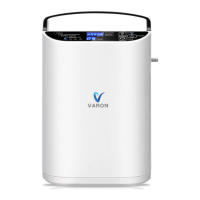
The picture is for reference only.Please refer to the actual product

Questions and Answers

  • J
    jason96Aug 7, 2025
    What to do if VARON Medical Equipment runs but the flow rate is small?
    • P
      Peter BaileyAug 8, 2025
      If your VARON Medical Equipment runs after starting but the flow rate is small, it might be due to a low flow rate setting. Try turning up the level of the flow rate. Alternatively, the tube might be twisted or blocked; in this case, straighten the tube. If the connecting tube inside the machine is disconnected or broken, disconnect the power supply and have it repaired by professional maintenance personnel.
  • E
    Emily ContrerasAug 17, 2025
    What to do if VARON Medical Equipment indicator light is normal but the machine fails to work properly?
    • A
      Allison JacobsAug 17, 2025
      If the indicator light on your VARON Medical Equipment is normal but the machine isn't working properly (making abnormal sounds), there are a few potential causes. It could be a compressor failure or that the connecting tube inside the machine is disconnected or broken; in either case, disconnect the power supply and have it repaired by professional maintenance personnel. Alternatively, the ambient temperature may be too high, activating the self-protection program of the oil-free compressor. This is normal, and the machine will restart automatically when the temperature lowers.
  • S
    Steven TateAug 27, 2025
    Why does my VARON Medical Equipment have an odor?
    • L
      Lisa MooreAug 27, 2025
      The odor in the air stream of your VARON Medical Equipment is a normal smell emitted by silicone tubes and ABS plastic parts. It has been tested to be non-toxic and harmless and will gradually disappear with the use of the machine.

Summary

Precautions

Working Principle

Product Description

List of Attachments

Technical Specifications

External View

Operation Steps

Instructions for the Panel

Introduction to the display

Explains the oxygen concentration, timing, and flow rate indicators on the display.

Function buttons

Details the operation of the ON/OFF and Flow control buttons on the panel.

Instructions for the Remote Control

Specific Functions

Power saving mode

Explains how the display dims to save power when idle.

Sleep mode

Describes activating sleep mode via remote control to turn off the display.

Cumulative timing

Details the machine's function to record and display total running time.

Self-checking function

Explains the self-diagnostic feature to identify malfunctions, including error codes.

SOS voice

Describes the emergency voice broadcast feature activated by the SOS button.

Maintenance and Repair

Clean the shell

Instructions for cleaning the exterior casing of the machine with a damp cloth.

Clean or replace filter and filter pad

Guidance on cleaning or replacing the air filter to maintain performance and longevity.

Fuse replacement

Long-term idle

Trouble Shooting

Other Matters

VARON NT-4/VH03 Specifications

General IconGeneral
CategoryMedical Equipment
ModelNT-4/VH03
TypeNebulizer
Particle Size1-5 microns
Noise Level<50 dB
Operation ModeContinuous

Related product manuals