Need help?
Do you have a question about the VASAGLE ULWD70 and is the answer not in the manual?
Read assembly and safety instructions thoroughly, use product as intended, save manual for future reference, and pass along if sold.
Item for household/office use. Assemble per manual. Hand-tighten screws first; 2 adults recommended for assembly.
Keep small parts from children. Do not climb. Avoid sharp objects/chemicals. Use caution with defective parts. Max load 50kg.
Align all screws with pre-drilled holes first, then tighten one by one.
Connect support beams C and D to frame B using screws O and Q.
Attach side frames E and F to frame B using screws O and nuts S.
Connect crossbars C and G to the frame using screws Q and R.
Connect rear crossbars H and G to the frame using screws Q and R.
Secure diagonal braces E, F, C, D using screws I and R.
Place tabletops J and K onto the assembled frame and secure with screws P.
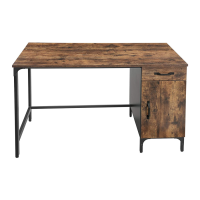
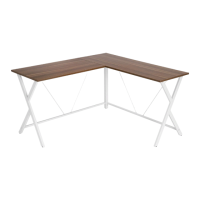
This document outlines the assembly and usage instructions for a corner desk, designed for both household and office environments. The manual emphasizes the importance of proper assembly and maintenance to ensure the product's longevity and user safety.
The primary function of this device is to provide a stable and spacious work surface, specifically designed to fit into a corner, maximizing space utilization. Its L-shaped configuration allows for a larger desktop area compared to traditional rectangular desks, facilitating multi-tasking and accommodating various office equipment such as monitors, keyboards, and other peripherals. The desk is constructed with a metal frame and wooden tabletops, offering a blend of durability and aesthetic appeal suitable for modern interiors.
The desk is designed for ease of assembly, though it is recommended that at least two adults undertake the process to ensure stability and correct alignment of parts. The assembly steps are clearly illustrated with diagrams and accompanied by textual instructions, guiding the user through each stage. A key feature highlighted in the assembly process is the recommendation to align and hand-tighten all screws in their corresponding pre-drilled holes first, before fully tightening them one by one. This sequential tightening method helps prevent misalignment and ensures a secure and stable structure.
The adjustable feet are a crucial usage feature, designed to prevent the table from slipping and to protect floors from scratches. This feature also allows for minor adjustments to compensate for uneven floor surfaces, ensuring the desk remains level and stable. The L-shaped design offers flexibility in placement, making it ideal for corners in various rooms, from home offices to study areas or even commercial workspaces. The two distinct tabletop sizes (950 x 500 mm and 1300 x 500 mm) suggest a modular design that can be configured to suit different spatial requirements or user preferences, although the manual presents a fixed L-shape configuration. The maximum load capacity of 50 kg ensures that the desk can safely support a considerable amount of weight, including multiple monitors, books, and other work essentials, without compromising its structural integrity.
The desk's design incorporates cross-braces (parts A) for enhanced stability, which are integrated into the frame during assembly. These cross-braces contribute significantly to the overall rigidity of the structure, minimizing wobbling and ensuring a firm work surface. The various metal bars (parts C, D, E, F, G, H) form the robust framework, providing strong support for the tabletops. The inclusion of different screw types (O, P, Q, R) and an Allen wrench (T) indicates a comprehensive assembly kit, ensuring users have all necessary components for construction. The M6 nuts (S) further secure critical connections, reinforcing the desk's stability.
The assembly process is broken down into seven distinct steps, each building upon the previous one. Step 1 involves assembling the initial cross-brace supports with vertical posts and adjustable feet. Step 2 integrates horizontal support bars, forming the base of one section of the desk. Steps 3, 4, and 5 continue to build the frame, adding more horizontal and cross-brace supports to complete the L-shaped structure. Step 6 focuses on securing additional connections within the frame, ensuring all components are tightly integrated. Finally, Step 7 involves attaching the two tabletops (J and K) to the completed frame, using screws (P) to secure them in place. The illustrations clearly show the orientation of each part, which is critical for correct assembly.
The manual provides clear guidelines for the maintenance of the desk, focusing on preserving its appearance and durability. For daily maintenance, it is recommended to clean the product with a soft damp cloth. This gentle approach helps remove dust and light grime without damaging the surface. Following this, the surface should be wiped with a dry cloth to prevent water spots or moisture damage.
Crucially, the manual advises against wiping the surface with hard or abrasive objects. This warning is vital for protecting the finish of the tabletops and the metal frame from scratches, dulling, or other forms of damage that could compromise the desk's aesthetic and structural integrity over time. Avoiding direct sun exposure is another important maintenance tip, as prolonged exposure to sunlight can lead to surface damage, such as fading or warping, and can decrease the overall durability of the materials.
Regular inspection is a key maintenance feature emphasized in the manual. Users are advised to periodically inspect the desk to ensure that all screws are tightened. If any screws are found to be loose, they should be retightened immediately. This proactive measure is essential for maintaining the structural integrity and safety of the desk, preventing potential hazards that could arise from a wobbly or unstable structure. This ongoing maintenance ensures that the desk remains safe and functional throughout its lifespan.
The warnings section also touches upon maintenance indirectly by advising against using the product if there are defective or missing parts. This implies that before and during assembly, users should check all components to ensure they are in good condition, which is a form of preventative maintenance. Avoiding contact with sharp objects or corrosive chemicals is also a maintenance-related warning, as these can cause irreparable damage to the desk's surfaces.
In summary, the desk is designed as a practical and durable piece of furniture for various work environments. Its usage features prioritize ease of assembly, stability, and space efficiency, while its maintenance features focus on simple, regular care to ensure long-term aesthetic appeal and structural soundness. The comprehensive manual serves as an invaluable resource for users, guiding them through every step from assembly to ongoing care.
 General
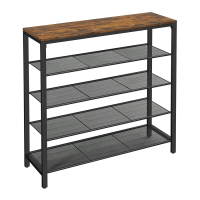
| Product Type | Bookshelf |
|---|---|
| Number of Shelves | 5 |
| Assembly Required | Yes |
| Material | Metal |
| Color | Rustic Brown |

 To Next Page