21
English
1– Buttons
Volume buttons – use +/- it to increase or decrease the volume.
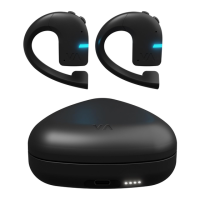
Push-to-talk button – press the earbud against your ear and
release it to start the speech recognition process, and begin
talking.
2– Charging case
Earbuds charging – place the earbuds inside the charging case
and close it to begin charging.
Case charging – connect the charging case to the USB AC
adapter (commercially available) or to a PC using the USB cable
(supplied). The rating of the charging output should be DC 5V,
at least 0.5A. The battery level of the charging case is represented
by the LED indicator.
3– First-time use – using the mobile app
Download and install the Vasco Connect app on your smartphone.
This is a dedicated mobile app for use with Vasco Translator E1.
You can download it from the following:
• the App Store (devices with iOS systems)
• the Google Play Store (devices with Android systems).
Run the Vasco Connect app – once you have downloaded and
installed Vasco Connect on your smartphone, run the app.


 To Next Page