22
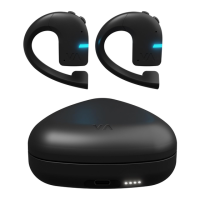
Take the earbuds out of the charging case to turn them on. The
pairing process will begin automatically, and the earbuds should
be found by Vasco Connect and listed in the app.
Allow the mobile app to access the location and Bluetooth
connection on your smartphone.
Select your earbud from the list in the app. It will light up
and connect.
Personalize your earbud. Type a name, select your lan-
guage, set a volume level, and select the color in which
your earbud is to light up.
You can add another earbud and repeat the process, or
immediately start using your earbud.
If you wish to unpair the earbud from your mobile phone,
choose “Forget” from the drop-down list in the app or press
the Volume Up and Volume Down buttons on the earbud
simultaneously for 3 seconds.
If you wish to restore your earbud to its default settings,
press the Volume Up and Volume Down buttons on the
earbud simultaneously for 10 seconds.
4– Conversation
Start the conversation – put your earbud on and tap “Go to
conversation”. Now you can switch between the translation
modes you prefer.
Loudspeaker mode – this allows you to use both the earbuds
and the mobile app to communicate with someone else. This is


 To Next Page