23
the default mode when you have only one earbud paired, but you
may also use it with more earbuds that are connected to the app.
Select the language of your conversation partner by choos-
ing the right option from the drop-down list.
Press the earbud against your ear, release it and start
talking. The translated text will appear on the screen and
play through a speaker.
Tap the icon in the app to begin translating the other per-
son’s speech.You will hear the translation in your earbud
and see its visual transcription on the screen.
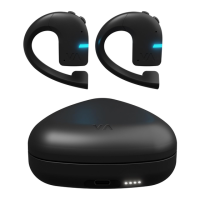
Earbuds mode – it allows you to talk directly with 2 or more
people using earbuds that are paired with a single mobile app.
Pair the earbuds with the Vasco Connect app and person-
alize them (set the name, language, volume and color).
Press the earbud against your ear and release it to start
talking. Once you have nished speaking, the translated text
will appear on the screen and play through the earbuds of
your conversation partners.
Now your conversation partner can press and release their
earbud to start talking. The translated text will appear on
the screen and play into your earbud.
You can also choose touchless translation. Once enabled,
you don’t have to press the earbud. Just start speaking and
the device will automatically translate your conversation.
Finish the conversation – once you have nished the conversa-
tion, place your earbud back into the charging case.


 To Next Page
 Loading...