VASNER
19
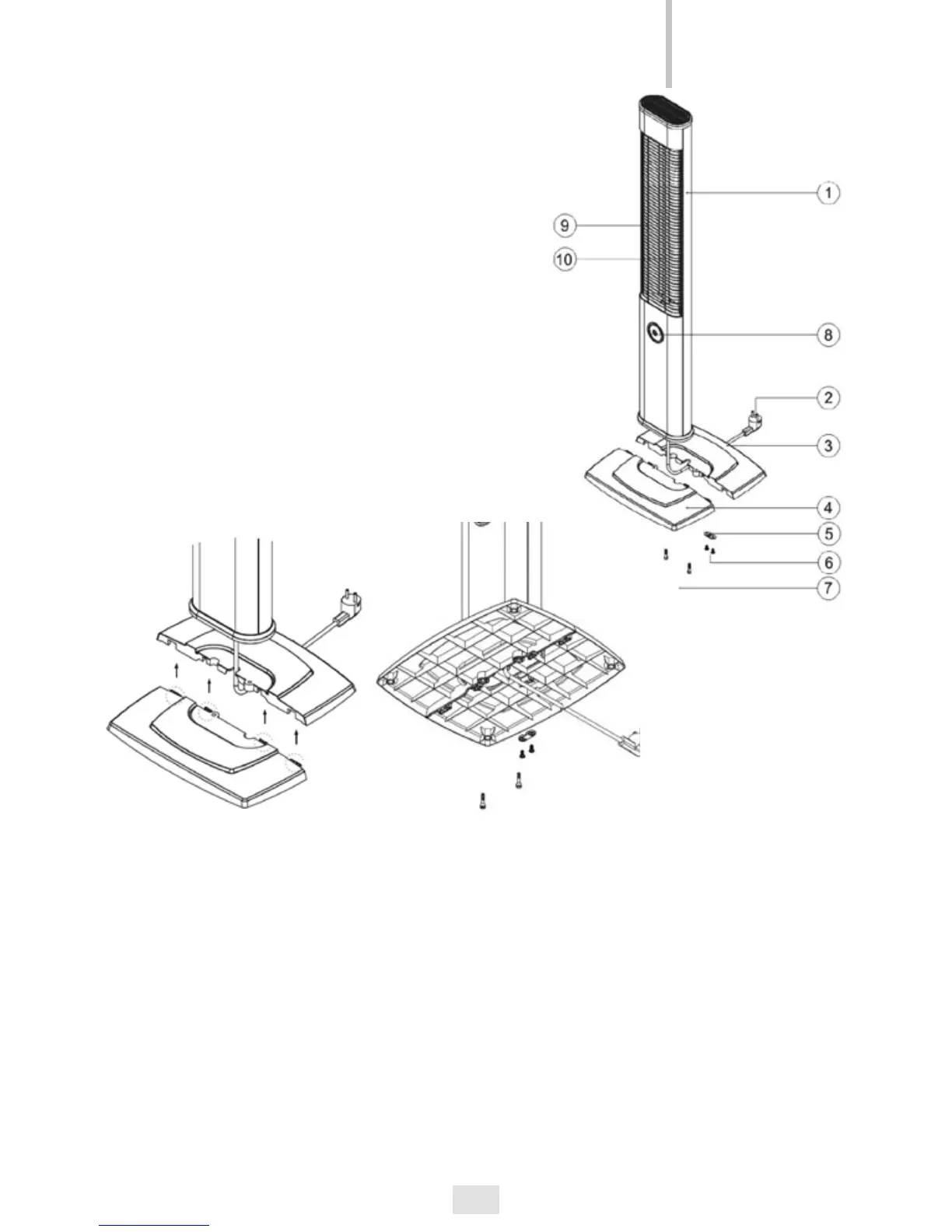
Component parts
(1) Appliance body
(2) Power cable
(3) Pedestal base front plate
(4) Pedestal base rear plate
(5) Power cable xture
(6) Screws for xing power cable
(7) Screws for xing the base plate
(8) Function knob / ON / OFF / Thermostat
(9) Protective grid
(10) Carbon Infrared Heating Tube
Mounting the StandLine Mini 12
• First of all, please place the power cable between both plates of the base
• Then plug together the two base plates with an accurate t. The cable leads
now through the base plate through the center hole
• Now position the StandLine on the base plate and x it from the bottom
with the two ring washers and screws
• Lead the power cable between the slots and recesses and x it with the
cable xture and the two small screws
• The VASNER StandLine Mini is now ready to use.
GB


 To Next Page