VASNER
20
Usage of StandLine Mini 12
• Plug in the device.
• Turn the thermostat switch to level 1. At level 1, the StandLine Mini runs at
half power at approx. 600 W.
• The rotary range from level 1 to MAX designates the range that is controlled
by the integrated thermostat.
• Turn the rotary knob until the StandLine Mini jumps to the maximum level
at 1200 watt. The point at which the heater switches upwards is the ther-
mostat point of your current room temperature.
• If you leave the rotary knob here, the room temperature will be maintained
using 1200 watt. If the room continues to heat up, the StandLine Mini auto-
matically switches to half power at approx. 600 W.
• If you would like to heat the room even further, you can turn the rotary
knob clockwise up to MAX to set the thermostat’s switch-o point to a
higher temperature.
Caution:
At level 1 and 2, the device NEVER turns o completely. Even when operating
using the thermostat function. A minimum of 600 watt is always used to heat
the room.
GB
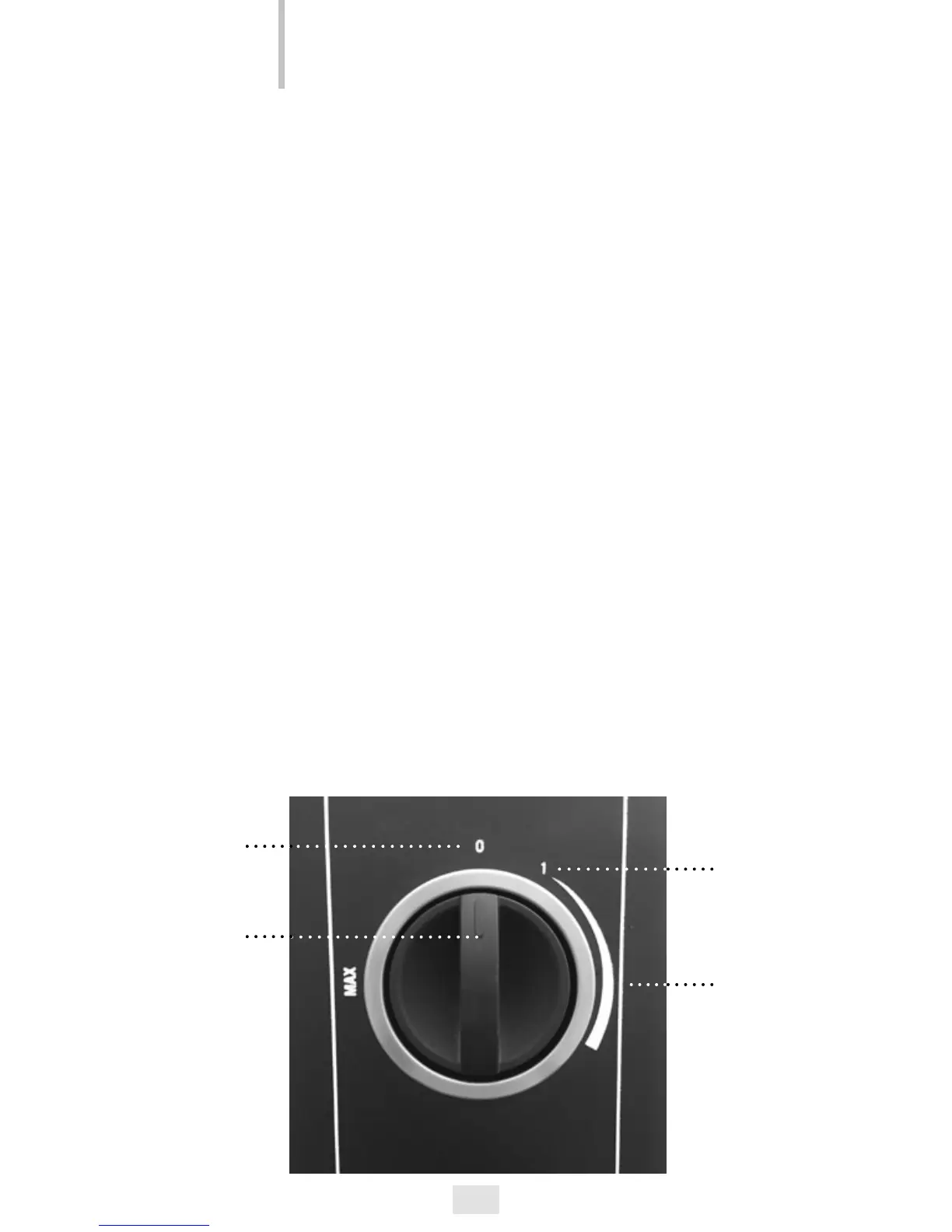
OFF
Function knob
+ Thermostat
switch
Level 1
600 W
Level 2
1200 W
+
Thermostat
up to MAX


 To Next Page