10 Introduction
or deactivate speech
recognition ............................ 61
or activate/deactivate
mute function ........................ 11
For a description of all other controls,
see Owner's Manual.
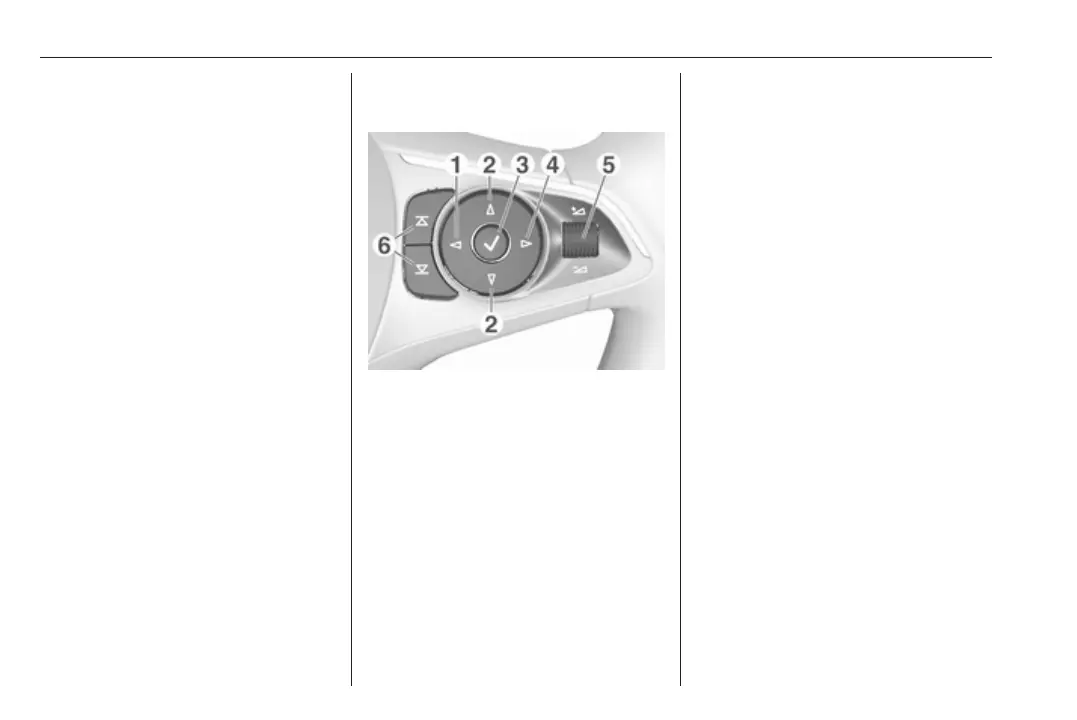
1 m
Press: display menu for
application selection;
return to next higher menu
level on the Driver
Information Centre (see
images below)
2 d / c
Short press: select menu
item on the Driver
Information Centre
Long press: fast-scroll
through a long contacts list
on the Driver Information Centre
3 9
Press: confirm selection
on the Driver Information Centre
4 n
Press: display application-
specific main menu on the
Driver Information Centre
5 À / Á ............................... 11
Press upwards: increase volume
Press downwards:
decrease volume


 To Next Page
 Loading...
