Instruments and controls 93
■ Infotainment system, see
description in the Infotainment
system manual
■ settings for vehicle personalisation
3 99
Colour-Info-Display
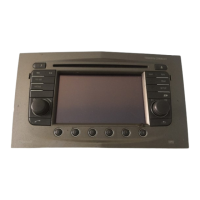
The Colour-Info-Display indicates in
colour:
■ time 3 76
■ outside temperature 3 76
■ date 3 76
■ Infotainment system, see
description in the Infotainment
system manual
■ navigation, see description in the
Infotainment system manual
■ system settings
■ vehicle messages 3 94
■ settings for vehicle personalisation
3 99
The type of information and how it is
displayed depends on the equipment
of the vehicle and the settings made.
Selecting menus and settings
Menus and settings are accessed via
the display.
Selections are made via:
■ menus
■ function buttons and multifunction
knob of the Infotainment system
Selecting with the Infotainment
system
Select a function via the Infotainment
system buttons. The menu of the
selected function is displayed.
The multifunction knob is used to
select an item and to confirm.
Multifunction knob
The multifunction knob is the central
control element for the menus:



 To Next Page
 Loading...