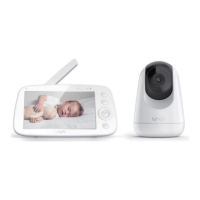
This document outlines the features, functions, and operational guidelines for the VAVA Baby Monitor, Model VA-IH006. It serves as a comprehensive user manual, providing instructions for setup, daily use, and troubleshooting to ensure a safe and effective monitoring experience for your baby.
Function Description
The VAVA Baby Monitor is designed to provide parents with a reliable way to monitor their baby's activities from a distance. The system consists of a baby monitor (receiver) and a camera (transmitter), which communicate wirelessly. The primary function is to transmit real-time video and audio from the baby's room to the parent's monitor, allowing for continuous supervision.
Key functionalities include:
- Real-time Video Monitoring: The camera captures video of the baby's environment, which is displayed on the monitor. This allows parents to visually check on their baby without entering the room.
- Audio Monitoring: The camera is equipped with a microphone to pick up sounds from the baby's room, transmitting them to the monitor. This enables parents to hear their baby's cries, coos, or other sounds.
- Night Vision: For monitoring in dim or dark environments, the camera automatically activates night vision, providing clear black and white images up to a certain distance. This ensures continuous visibility even at night.
- Two-Way Talkback: The monitor features a talkback function, allowing parents to speak to their baby through the camera. This can be used to soothe the baby with the sound of a parent's voice or to communicate with another caregiver in the room.
- Temperature Alert: The system includes a temperature sensor on the camera that monitors the room temperature. Parents can set alerts for temperatures that are too high or too low, ensuring the baby's comfort and safety.
- VOX Mode (Voice Operated eXchange): This feature allows the monitor to remain in a low-power state until a certain sound level is detected in the baby's room. Once activated by sound, the monitor will display video and transmit audio, conserving battery life.
- Lullabies: The camera can play pre-programmed lullabies to help soothe the baby to sleep. Parents can select specific lullabies or set them to play in a loop.
- Alarm Function: An alarm can be set on the monitor to remind parents of feeding times or other scheduled events.
- Digital Zoom: The monitor allows users to digitally zoom in on the video feed (2X or 4X) to get a closer look at the baby.
- Pan-n-Tilt: The camera's view can be remotely adjusted from the monitor, allowing for vertical (108 degrees) and horizontal (270 degrees) panning and tilting to cover a wider area of the room.
- Multi-Camera Support: The system supports up to four cameras, allowing parents to monitor multiple rooms or different angles within the same room. The monitor can display a single camera view, cycle through multiple cameras, or show a split-screen view of two cameras simultaneously.
Usage Features
The VAVA Baby Monitor is designed for ease of use with several features to enhance the monitoring experience:
- Simple Setup: The monitor and camera are pre-paired at the factory, making initial setup straightforward. Users simply need to power on both devices for automatic connection.
- Charging and Powering: The monitor is powered by a rechargeable battery and comes with a USB-C charging cable and adapter. The camera is powered via a Micro-USB cable and adapter. Power indicators on both devices show their status.
- Intuitive Interface: The monitor features a clear display and a user-friendly menu system with dedicated buttons for common functions like zoom, talkback, and menu navigation.
- Adjustable Volume and Brightness: Users can easily adjust the speaker volume and screen brightness on the monitor to suit their preferences and environment.
- Auto-Sleep Time: The monitor can be set to automatically enter a sleep mode after a specified period of inactivity, conserving battery while still monitoring audio. Any button press will wake the screen.
- Split Screen Display: When multiple cameras are connected, the monitor can display two camera feeds simultaneously, with audio switching between them every 15 seconds.
- Camera Management: The monitor allows users to add, view, and delete cameras from the system, providing flexibility for expanding the monitoring setup.
- Language Options: The monitor supports multiple languages (English, Español, Deutsch, Français) for the user interface.
- Factory Reset: A factory reset option is available in the settings menu to restore the monitor to its default settings.
- Wide-Angle Lens (Optional): An optional wide-angle lens (sold separately) can be installed on the camera to provide a broader field of view (approximately 170 degrees), which is useful for monitoring larger areas.
Maintenance Features
To ensure the longevity and optimal performance of the VAVA Baby Monitor, the following maintenance guidelines are provided:
- Cord Safety: It is crucial to keep all power cords out of the reach of children (more than 3ft / 0.9m away) to prevent strangulation hazards.
- Placement Safety: Never place the camera or its cord in or near the crib or playpen. Avoid mounting the camera directly above the crib to prevent injury risks.
- Adapter Usage: Only use the AC adapters provided with the device. Using unauthorized adapters can damage the unit and void the warranty.
- Water and Heat Avoidance: Do not use the unit near water sources (bathtubs, sinks, etc.) or heat sources (radiators, stoves, etc.) to prevent damage and ensure safe operation.
- Ventilation: Do not block any ventilation openings on the camera or monitor to prevent overheating.
- Cleaning: Clean the camera with a dry cloth only. Avoid using liquids or abrasive cleaners.
- Microphone Feedback Prevention: To avoid microphone feedback, keep the monitor and camera at least 1.5m / 4.9ft apart.
- Regular Checks: Regularly check the reception and condition of the camera, especially after changing its location.
- Indoor Use Only: The device is intended for indoor use only.
- Long-Term Storage: Unplug the device when it will be unused for long periods.
- Professional Service: Do not insert anything into the upgrade pinholes; this operation is intended for professionals only.
- Firm Mounting: When wall-mounting the camera, ensure it is firmly secured using a screw and screw anchor to prevent it from falling.
- Troubleshooting Guide: The manual includes a comprehensive troubleshooting section to help users diagnose and resolve common issues such as power problems, connection issues, audio/video quality problems, and noise.
- Customer Service: Contact information for customer service (email and phone number) is provided in the monitor settings and on the back cover of the user guide for assistance with any issues.
- Warranty: The product comes with a 12-month warranty and lifetime customer service.



 To Next Page

 General