Vax Careline: AU: 1300 361 505
NZ: 0800 800 900
15
Operation
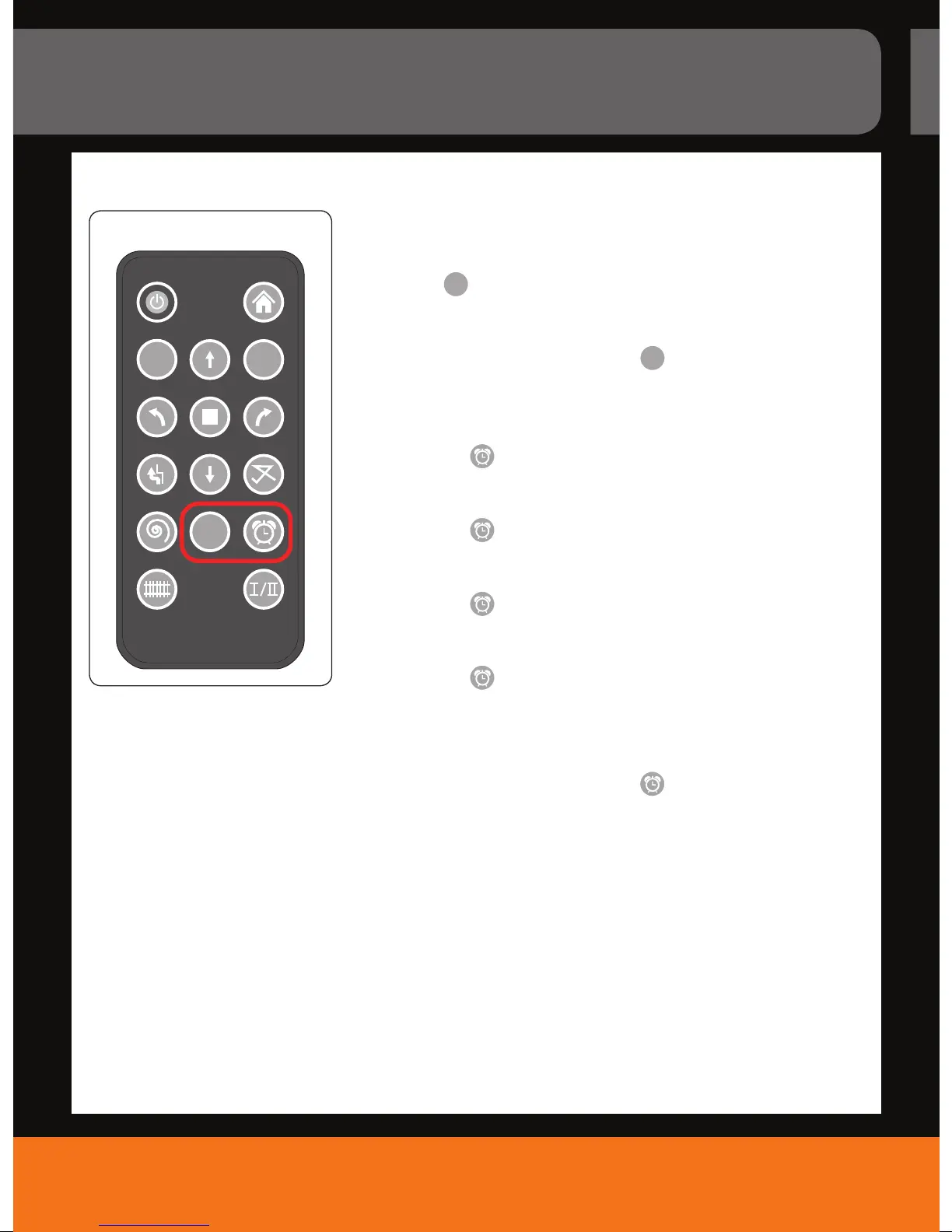
There are 2 ways to schedule cleaning:
Cleaning right now and same time each day:
1. Press the “
24
HOUR
“ key on the remote control (Fig. 21).
- Your robot will start cleaning right away.
- Your robot will start cleaning at the same time each day.
NOTE: To deactivate this timer, press the “
24
HOUR
“ key again.
Cleaning in 1, 2, 4 or 8 hours
If you press the “
“ key once:
- You will hear one beep sound.
- Then the appliance will start cleaning after 1 hour.
If you press the “
“ key twice:
- You will hear two beep sounds.
- The appliance will start cleaning after 2 hours.
If you press the “
“ key three times:
- You will hear four beep sounds.
- The appliance will start cleaning after 4 hours.
If you press the “
“ key four times:
- You will hear eight beep sounds.
- The appliance will start cleaning after 8 hours.
NOTE: To deactivate this timer, press the “
“ key for 2 to 3 seconds.
Scheduling a cleaning cycle
Go
A
24
HOUR
21.



 To Next Page