7
Softkey function selection mode OPERATION
Short press FUNCTION selection button (23) on desired mode can change the
displaying from F1 to F2.
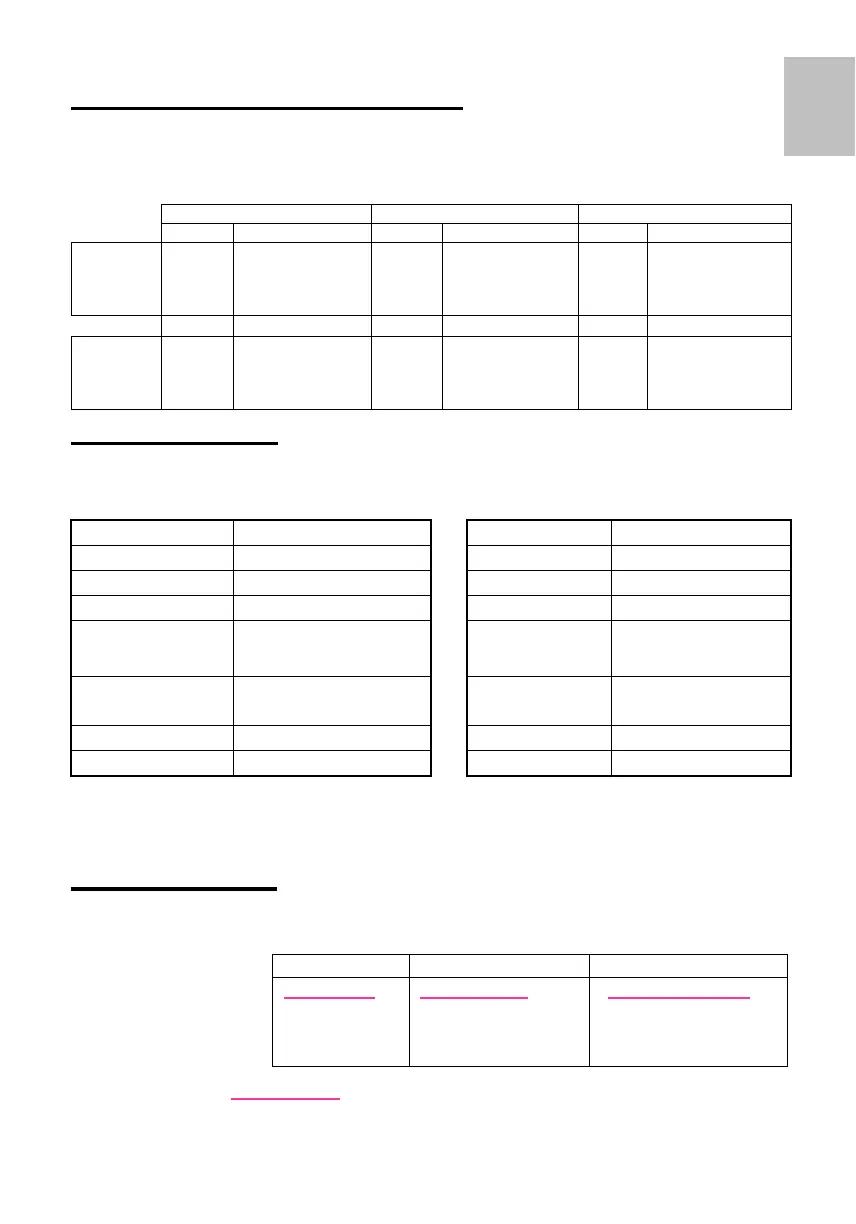
Main Softkey functions :
Tuner CD / MP3 AUX
Label function Label function Label function
F1- Key 1
F1- Key 2
F1- Key 3
BND
SCN
TA
Band
Frequency Scan
Traffic
Announcement
RND
SCN
RPT
Random play
Track scan
Repeat track
TA
Traffic
Announcement
F2- Key 1
F2- Key 2
F2- Key 3
PTY
AF
AST
PTY search
Alt. Frequency
Autostore
PAU
TA
Pause
Traffic
Announcement
SET UP mode operation
Long press FUNCTION selection button (23) more than 2 seconds to activate the set up
mode and change the desired setting accordingly.
Set-up Mode
Subject Options Subject Options
Illumination Color 1 / 2 / 3 REGIONAL ON / OFF
BLEEP LEVEL BLEEP OFF, 1, 2, 3, 4 TA - Volume TAVOL -2, -1, 0, 1, 2
Clock RDS / OFF
LO / DX Local / DX
Time Adjust Hours
(if man.clock)
Hours blinking 00-12 or
23
MW ON / OFF
Time Adjust Min’s
(if man.clock)
Minutes blinking 00-59 LW ON / OFF
Tuner configuration EURO/ USA / ASIA AUX-IN ON / OFF
RDS ON / OFF
AUX-IN LEVEL AUX LEVEL 1,2,3,4
Use
▲
▼
to select subject.
Volume knob to select options.
The new selection is immediately memorised.
Display mode operation
Short press DISP button (4) on desired mode can change the displaying
information follow as below listed table.
Display key
Sequential information
After 5 sec, return to main display
.
Long Press DISP button (4) to toggle the brightness of LCD illumination.
Tuner Mode CD / MP3 Mode CD Mode
Station Name
Frequency
RDS Clock
PTY
Title / track time
Clock (If it is turned ON)
Album ID3
Title ID3
Elapsed Track / Time
Clock
Total Tracks
English



 To Next Page