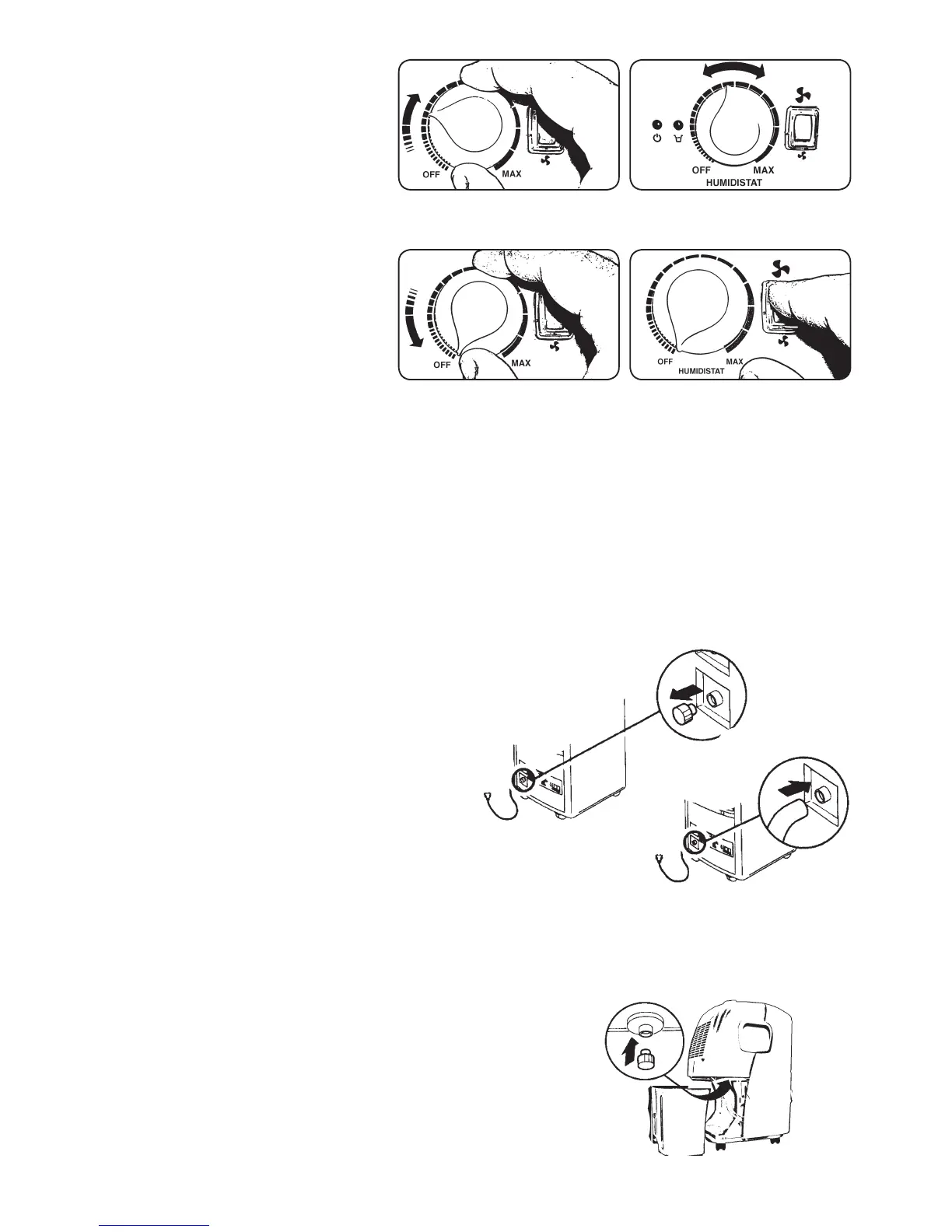
Fig. 1 Fig. 2
Fig. 3 Fig. 4
B
Fig. 5
Fig. 6
Fig. 7
A
Connect the dehumidier into
a correct mains socket (please
check the rating label on the
rear side of the unit). The power
indication lamp shall now be
lighted.
Set the humidity controller on
required humidity level or ”MAX”
for continuous operation (Fig. 1).
The intensity of dehumidication
is increased by turning the switch
clockwise (Fig. 2).
To turn off the unit, turn the switch
to position ”OFF” (Fig. 3).
Emptying of the water tank
When the water tank is full the unit will switch off
automatically and the ”Water Full” indicator will turn
into red. At this time, please empty the water tank
as follows:
• Use the handle to pull the water tank slightly
upwards and then out for easy removal.
• After emptying the tank, push it back
into position.
Note! If the tank doesn’t position well,
the “Water Full” indicator will still light red.
Optional:
The dehumidier LAF 10 can also be connected to
a drain hose as follows:
1. Remove the water cap (A) from the back of the
unit. Connect a drain hose with diameter 6 mm.
(Fig. 5, 6).
2. Pull out the water tank, put the water cap from
the back of the unit into drain hole (B), found in
the compartment (Fig. 7).
3. Ensure that the water always drains away freely
and the hose remain in place.
4. Put the water tank back in position.
LAF 10 is equipped with a two-speed fan. Under normal conditions set the fan speed
on ”HI”. Should you require a more quiet operation, set the speed on ”LO”. Position ”HI”
gives the most effective dehumidication, but by lower levels of humidity in the air position
”LO” can sometimes be somewhat more effective (Fig. 4).



 To Next Page