X2-OPERATIONS MANUAL BUTTON DISPLAY
Doc: 70-00-0950A, Serie X2, 20211220 © Vector Controls GmbH, Schweiz Page 9-16
Subjects to alteration www.vectorcontrols.com
5.3 Set Time Schedules
Overview
Up to 12 time and weekday programs or annual holidays can be programmed (Pr01 to Pr12).
5.3.1 Time schedule enable/disable
Overview
This section describes how to generally enable/disable timed events (schedules) on a X2 device.
Procedure
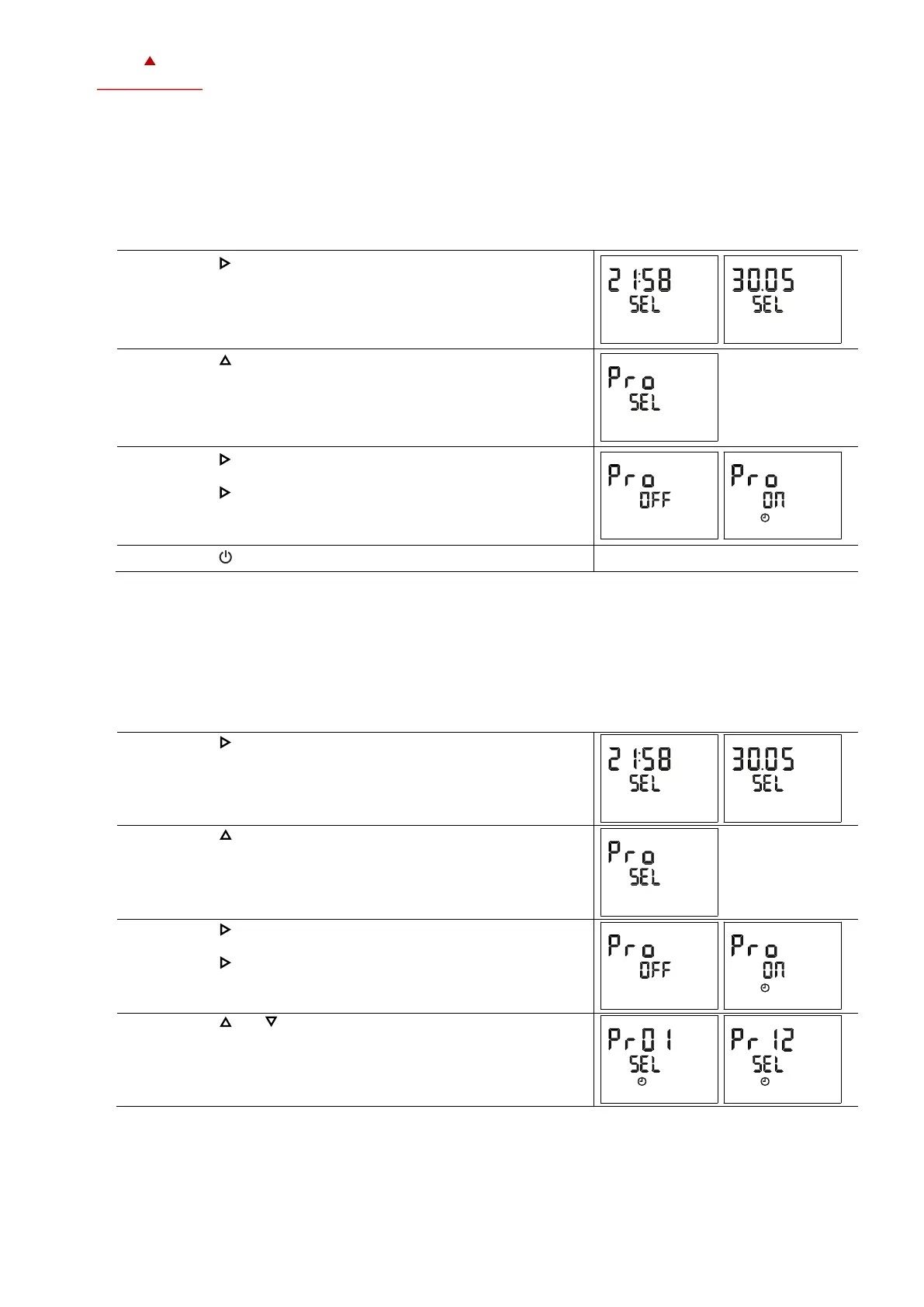
1. Press the ( / ) button longer than 2 seconds.
➔ SEL and the actual Date and Time are displayed alternatingly.
2. Press the ( ) button briefly to go to the scheduler submenu.
➔ PRO and SEL is displayed.
3. Press the ( / ) button: Schedule status indicates whether it is
OFF or ON.
Press the ( / ) button to change the status.
➔ When schedule is ON, is displayed.
Press the ( ) button (1x) to go back to the previous submenu.
5.3.2 Set weekly time schedules
Overview
This section describes how to set a daily, weekly repeated action/function.
Up to 12 time and weekday programs can be programmed (Pr01 to Pr12).
Requirements
Time schedule is enabled (see chapter 5.3.1).
Procedure
1. Press the ( / ) button longer than 2 seconds.
➔ SEL and the actual Date and Time are displayed alternatingly.
2. Press the ( ) button briefly to go to the scheduler submenu.
➔ PRO and SEL is displayed.
3. Press the ( / ) button: Schedule status indicates whether it is
OFF or ON.
4. Press the ( / ) button to change the status.
➔ When scheduler is ON, is displayed.
5. Press the ( ) or ( ) button to select between programs
Pr 01…Pr 12.






 To Next Page