
 Need help?
Do you have a question about the VEEZOOM WS-N151HB and is the answer not in the manual?
Outlines the manual's scope, covering web management, network access, configuration, and troubleshooting.
Defines symbols used in the document, like 'NOTE' for important information and best practices.
Disclaimer stating the manual is for reference and may not perfectly match the actual product.
Details the VEEZOOM PoE camera's high resolution, built-in microphone, and advanced detection technology.
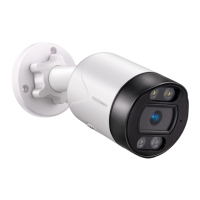
Illustrates and labels key components and features of the WS-N151BS and WS-N151HB camera models.
Explains three methods to power VEEZOOM PoE cameras: via PoE NVR, DC adapter, or PoE injector/switch.
Step-by-step guide with diagrams for physically installing the camera, including drilling and adjusting.
Guides on downloading the Veezoompro APP, registering a new account, and logging in.
Details two methods for adding cameras: automatic LAN discovery and QR code scanning.
Explains how to access and navigate the live video feed, including an overview of interface icons.
Covers multiple views, two-way audio, HD/SD switching, audio monitoring, image size, and full-screen playback.
Details infrared modes (On, Off, Auto) and night modes (Smart, Infrared, Color Light).
Instructions on setting up humanoid motion detection, defining zones, adjusting sensitivity, and alerts.
Guides on setting up motion recording and continuous recording to the Micro SD card.
Instructions on how to replay recorded videos and download them from the camera.
Explains setting up a home, adding family members, and managing rooms within the APP.
Describes viewing weather and environmental data collected by the APP and sensors.
Covers modifying device icon, name, location, and viewing device ID, IP, and time zone.
Details specifications, installation, removal, and formatting for Micro SD cards.
Instructions on removing a device from the APP and performing firmware OTA and automatic upgrades.
Addresses common queries about Ethernet cables, PoE injectors, camera connectivity, and remote access.
Provides solutions for issues like camera power failure and third-party software compatibility.
 General
| Brand | VEEZOOM |
|---|---|
| Model | WS-N151HB |
| Category | Digital Camera |
| Language | English |

 To Next Page
