4
PARTS AND CONTROLS
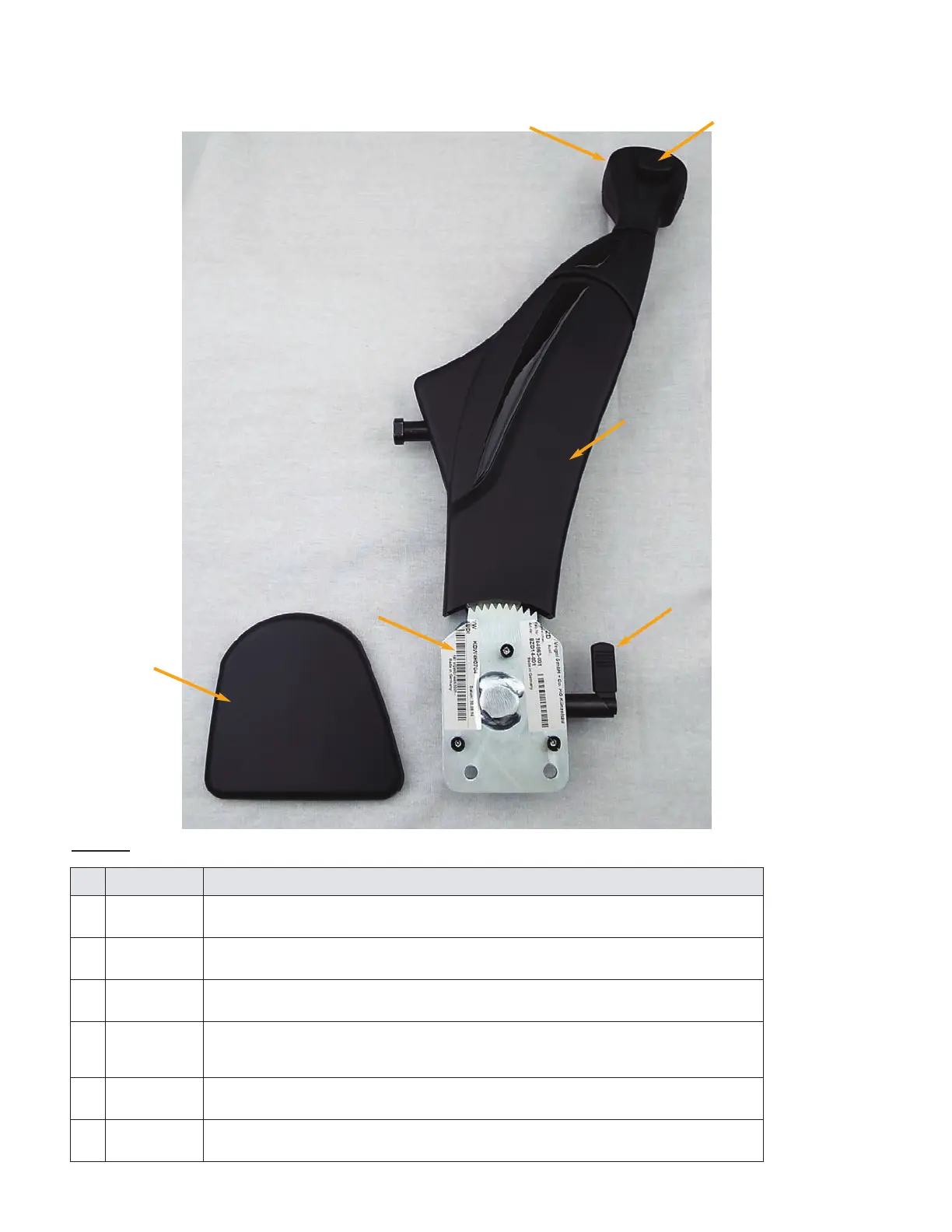
The operator components of an installed hand control are shown in Figure 2 and described in the
following table.
FIGURE 2: Parts & Controls
Description
No Name:
Pull this handle to work the accelerator pedal. See “Accelerator and Slowing
Down” on page 7.
1 Accelerator
Handle
Use this button to lock the brake. See “Locking the Brake” on page 8.2 Brake
Button
During maintenance or repair only. The cover opens to reveal the connec-
tions made between the hand control and the rods that operate the vehicles
3 Contoured
Cover
Use this lever to disengage the controls and fold the hand control out of the
way. See “Disengaging the Hand Control” on page 8 when possible.
4
Control
Release
Lever
This cover is applied to the side of the brake gear box (item 6, below).5 Lateral
Cover
Securely fastens the hand control to the inside of your vehicle.6 Brake Gear
Box
2
1
4
6
3
5


 To Next Page