
 Need help?
Do you have a question about the Veikk Creator Pop VK430 and is the answer not in the manual?
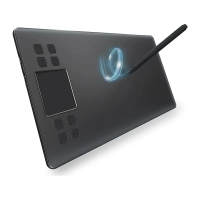
The VEIKK Creator Pop VK430 Pen tablet is a digital drawing tablet designed for creative professionals and enthusiasts. It offers a compact and portable solution for digital art, graphic design, and other creative tasks requiring precise pen input. The tablet is compatible with a wide range of operating systems and software, making it a versatile tool for various workflows.
The VEIKK Creator Pop VK430 Pen tablet serves as an input device that allows users to draw, paint, and navigate on their computer or Android mobile phone with a pressure-sensitive, battery-free pen. It translates pen movements and pressure levels into digital input, enabling natural and intuitive interaction with creative software. The tablet features a defined active area where pen input is registered, along with customizable shortcut keys to enhance workflow efficiency.
1. Connectivity: The tablet connects to your computer via a USB-A to USB-C cable. For macOS, Windows, and Linux computers, simply connect the tablet and install the driver. For Chrome OS computers and Android mobile phones, no driver installation is required; simply connect the tablet using the USB cable (or OTG adapter for mobile phones).
2. Pen Functionality: The VK430 comes with a battery-free passive pen, which means it never needs charging. The pen features two customizable buttons (Button 1 and Button 2) that can be programmed for various functions within the driver settings. The pen also has a nib that can be replaced when worn out.
3. Shortcut Keys: The tablet is equipped with 4 customizable shortcut keys (K1, K2, K3, K4) located on the side of the active area. These keys can be assigned to frequently used functions, keyboard shortcuts, or application-specific commands, significantly speeding up your workflow.
4. Driver Settings (Windows): The VEIKK Pen Tablet driver provides extensive customization options:
5. Driver Settings (Mac): Driver settings for Mac systems are similar to those for Windows, offering comparable customization options for pen functions, mapping, and shortcut keys.
6. Android Mobile Phone Usage: When connected to an Android mobile phone, the tablet works in mobile phone vertical screen mode only. For some mobile phones, you may need to enable the OTG function manually in the phone's settings. Note that the shortcut keys of the pen and tablet may not work on Android mobile phones.
1. Pen Nib Replacement: The pen nibs are designed to be replaceable. When a pen nib becomes heavily worn, it can be easily removed using the included nib removal tool and replaced with a new one. This ensures consistent drawing performance over time. The process involves inserting the nib into the pen holder hole, tilting to catch the nib, pulling it out, and then inserting a new nib until it stops.
2. Driver Updates: The VEIKK driver includes a "Check for updating" feature. Users can click this option to check for and install the latest driver version, ensuring optimal performance and compatibility with new software and operating systems. If a new driver is available, it can be updated directly through the interface.
3. Diagnostic Tools: The driver software includes "Diagnostic Tools" to help check for missing key files, which can be useful for troubleshooting driver-related issues.
4. Cleaning and Storage:
5. General Precautions:
The VEIKK Creator Pop VK430 Pen tablet is designed for ease of use and durability, with features that support a smooth and efficient creative process.

 To Next Page
 General