Trouble Shooting
ISSUE
OPTIONS
Cause: Yellow/red wire not connected or incorrect voltage
Action: Check connections for proper voltage (11-16V DC)
Cause: Black wire not connected
Action: Check connection to ground
Cause: Fuse blown
Action: Replace the fuse
Cause: Speaker wire not connected
Action: Check connections at speakers
Unit will not turn
on (no power)
Unit has power
(but no sound)
Unit blows fuses
Cause: One or more speaker wires touching each other
or touching chassis ground
Action: Insulate all bare speaker wires from each other
and chassis ground
Cause: Yellow/red wire touching chassis ground
Action: Check for pinched wire
Cause: Speaker wires touching chassis ground
Action: Check for pinched wire
Cause: Incorrect fuse rating
Action: Use fuse with correct rating
DAB+ Operation
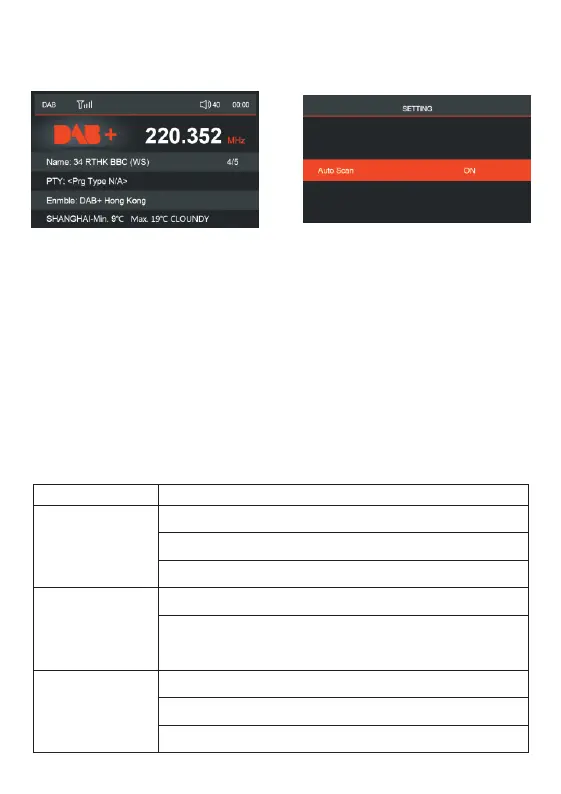
Select DAB+ from MENU or press SRC button to switch to DAB+ mode, VX565D
will automatically scan for local digital stations. This process may take a few
seconds depending on the numbers of stations available. As DAB+ stations are
found, they will be automatically stored into the DAB band memories. Once
scanning is complete, VX565D will begin playing the station stored in the first
memory location. And the station info will be displayed on the screen.
Tuning DAB stations
Press CH+ or CH- button to tune to next/previous DAB station.
Auto Programming Station
Long press'MENU' button and select 'AUTOSCAN'–'YES'to manually force a new
station search.
Long press 'MENU' button to activate DAB+ settings. (AUTOSCAN)


 To Next Page