EasyManua.ls Logo

Velleman K8055 - User Manual

Velleman K8055
16 pages
Print Icon
To Next Page IconTo Next Page
Loading...
Total solder points: 159
Difficulty level:
beginner 1 2 3 4 5 advanced
ILLUSTRATED ASSEMBLY MANUAL H8055IP-1
Specifications:
5 Digital inputs (0= ground, 1= open). On board test buttons pro-
vided.
2 Analog inputs with attenuation and amplification option. Internal
test +5V provided.
8 Digital open collector output switches (max 50V/100mA). On
board LED indication.
2 Analog outputs
0 to 5V, output resistance 1K5.
PWM 0 to 100% open collector outputs
max 100mA / 40V. On board LED indication.
General conversion time: 20mS per command
Power supply through USB approx. 70mA.
Diagnostic software and communication DLL included
Minimum system:
Pentium class CPU
USB1.0 or higher connection
Windows 98SE or higher (Win NT excluded)
CD ROM player and Mouse
K8055
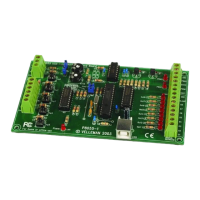
USB Experiment interface board
Question and Answer IconNeed help?

Do you have a question about the Velleman K8055 and is the answer not in the manual?

Summary

Product Specifications

Digital Inputs

Details on 5 digital inputs and on-board test buttons.

Analog Inputs

Details on 2 analog inputs with attenuation/amplification.

Digital Outputs

Details on 8 digital open collector output switches with LED indication.

Analog Outputs

Details on 2 analog outputs with PWM capability and LED indication.

Minimum System Requirements

CPU, connection, OS, and CD ROM requirements.

Assembly Preparation

Soldering Techniques

Soldering Process

Instructions on mounting components and soldering leads properly.

Solder Joint Quality

Guidance on achieving cone-shaped, shiny solder joints.

Component Installation - Part 4

Gain Factor Adjustment

Explanation and formula for calculating gain factors A1 and A2.

Connections and Settings Overview

Software Installation

Demo Software Installation Steps

Guide to installing the K8055 demo software from CD or website.

Testing the Device

Test Procedure Setup

Instructions for initial setup before testing, including address selection.

Connecting and Verifying

Steps to connect the USB cable and verify power/operation.

Technical Diagrams

Schematic Circuit Diagram

Detailed electrical schematic of the K8055 board.

PCB Component Layout

Visual guide showing component placement on the PCB.

Summary

Product Specifications

Digital Inputs

Details on 5 digital inputs and on-board test buttons.

Analog Inputs

Details on 2 analog inputs with attenuation/amplification.

Digital Outputs

Details on 8 digital open collector output switches with LED indication.

Analog Outputs

Details on 2 analog outputs with PWM capability and LED indication.

Minimum System Requirements

CPU, connection, OS, and CD ROM requirements.

Assembly Preparation

Soldering Techniques

Soldering Process

Instructions on mounting components and soldering leads properly.

Solder Joint Quality

Guidance on achieving cone-shaped, shiny solder joints.

Component Installation - Part 4

Gain Factor Adjustment

Explanation and formula for calculating gain factors A1 and A2.

Connections and Settings Overview

Software Installation

Demo Software Installation Steps

Guide to installing the K8055 demo software from CD or website.

Testing the Device

Test Procedure Setup

Instructions for initial setup before testing, including address selection.

Connecting and Verifying

Steps to connect the USB cable and verify power/operation.

Technical Diagrams

Schematic Circuit Diagram

Detailed electrical schematic of the K8055 board.

PCB Component Layout

Visual guide showing component placement on the PCB.

Velleman K8055 Specifications

General IconGeneral
BrandVelleman
ModelK8055
CategoryRecording Equipment
LanguageEnglish

Related product manuals