Need help?
Do you have a question about the Velleman K8062 and is the answer not in the manual?
Control DMX fixtures using a PC and USB interface, with stand-alone test function.
Highlights of the USB DMX interface's capabilities and included software.
Details on connectivity, DMX channels, compatibility, dimensions, and power requirements.
Lists required tools and provides general assembly and soldering tips.
Step-by-step guide for mounting diodes, resistors, ICs, capacitors, and other components.
Steps for attaching the PCB, connectors, enclosure, and stickers.
Instructions for installing the software from the CD and finding updates.
Guide to operating the unit in stand-alone mode using a 9V battery and the test button.
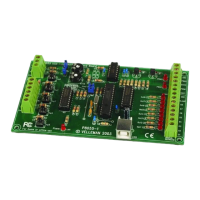
Diagram showing the component placement and labeling on the Printed Circuit Board.
Detailed circuit schematic illustrating the connections and components of the interface.
The Velleman K8062 is a USB-controlled DMX interface designed for controlling DMX fixtures using a personal computer. This device offers a versatile solution for lighting control, catering to both beginners and those looking to develop custom lighting applications.
The primary function of the K8062 is to bridge the gap between a computer and DMX-compatible lighting fixtures. It allows users to send DMX signals from their PC to control various lighting effects, such as dimming, color changes, and movement, depending on the capabilities of the connected DMX fixtures. The interface is powered and connected via a standard USB port, simplifying its setup and integration into existing systems.
A key feature of the K8062 is its stand-alone test function. This mode allows the device to operate independently of a computer, outputting all 512 DMX channels simultaneously with adjustable levels. This is particularly useful for quick testing of DMX fixtures or for basic, pre-programmed lighting scenarios without the need for a PC.
The device comes with included software to facilitate its use. This includes test software for basic functionality checks and "DMX Light Player" software, which provides a more comprehensive interface for creating and managing lighting shows. For users with programming knowledge, a Dynamic Link Library (DLL) is provided, enabling them to write their own custom software for controlling DMX fixtures, offering a high degree of flexibility and customization.
The K8062 is designed for ease of use, even for those new to DMX control. The assembly process is guided by detailed instructions, emphasizing careful soldering and component placement to ensure proper functionality. The manual includes helpful hints for soldering, such as using a good quality soldering iron with a small tip, keeping the tip clean, and using thin resin-core solder. It also advises on proper lead trimming and the use of tools like diagonal cutters and needle-nose pliers.
For the stand-alone test mode, a 9V battery is required. This mode is controlled by a single push button (SW1). A short press turns the unit on, illuminating the power LED and sending a DMX code of "0" to all 512 channels. Subsequent presses increment the DMX code, allowing users to gradually increase the levels on all channels. The "DMX signal" LED provides visual feedback, lighting periodically when the test button is pressed. The duration of these flashes increases with repeated presses, indicating changes in the DMX output. After 256 presses, the internal counter resets, returning the DMX output to "0". To turn off the device in stand-alone mode, the button must be pressed for approximately 9 seconds until the power LED extinguishes.
The software installation process is straightforward, involving browsing the provided CD for the K8062 folder and checking for relevant PDF files. The "DMX Light Player" software is installed by default in a designated program files directory. The DMX_demo software, as shown in a screenshot, provides a user-friendly interface for testing the unit and creating simple lighting shows, with controls for DMX values, scene management, fade times, and channel selection.
The K8062 incorporates several features to ensure its reliability and longevity. The DMX output is protected by solid-state fuse protection, which automatically resets, safeguarding the circuit from overcurrent conditions. This eliminates the need for manual fuse replacement, contributing to easier maintenance.
The device is designed to comply with FCC Rules, indicating that it has been tested to ensure it does not cause harmful interference and is not influenced by unwanted interference. This compliance is marked by a CE/FCC sticker affixed to the bottom of the housing, assuring users of its adherence to regulatory standards for home and office use.
The assembly instructions emphasize the importance of following the steps carefully to avoid issues. Users are advised to check the skill level required for the project and to read and understand each step before performing it. The manual also notes that values on the circuit diagram are subject to change, but the values in the assembly guide are correct, ensuring that users have the most up-to-date information for construction. In case of typographical inaccuracies or last-minute manual updates, users are directed to look for indications on a separate leaflet or to check the Velleman website for the latest information and color codes for resistances.
The kit includes an enclosure, a USB cable, and a CD with test software, the DLL for custom developments, and the free DMX light player. If any of these components are missing, users are directed to the Velleman website for support. Proper disposal of empty batteries is also highlighted, reminding users to respect national and local laws.
 General
| Channels | 2 |
|---|---|
| Power Supply | USB powered |
| Compatibility | Windows XP, Vista, 7, 8, 10 |
| Input impedance | 1 MΩ |
| Resolution | 8-bit |
| Output Impedance | 50 Ω |

 To Next Page