Introduction
Thank you for choosing Vello.
Congratulations on the purchase of your Vello Screen Protector Ultra. This screen protector is designed for long-term use to
protect your camera’s LCD from scratches, dust, smears, and even impact. It adheres to the LCD without leaving behind any sticky
residue, and it’s rigid, so it’s easy to apply without trapping any air bubbles underneath. The Vello Screen Protector Ultra is made
from ultra-clear, UV-protective Japanese optical glass that won’t aect the LCD’s image quality—in fact, you can barely tell it’s there!
To remove the Vello Screen Protector Ultra, push the screen protector to the side until you can lift it up to remove it completely.
Note: Select
Sony cameras
can develop
delamination of
the LCD screen
components.
Removing the
screen protector
from a faulty LCD
screen can cause
further damage.
Box Contents
•Vello Screen Protector Ultra
•Wet wipe
•Microfiber cleaning cloth
•Plastic applicator
•User manual (this booklet)
Please read these instructions carefully before applying your Vello Screen Protector Ultra.
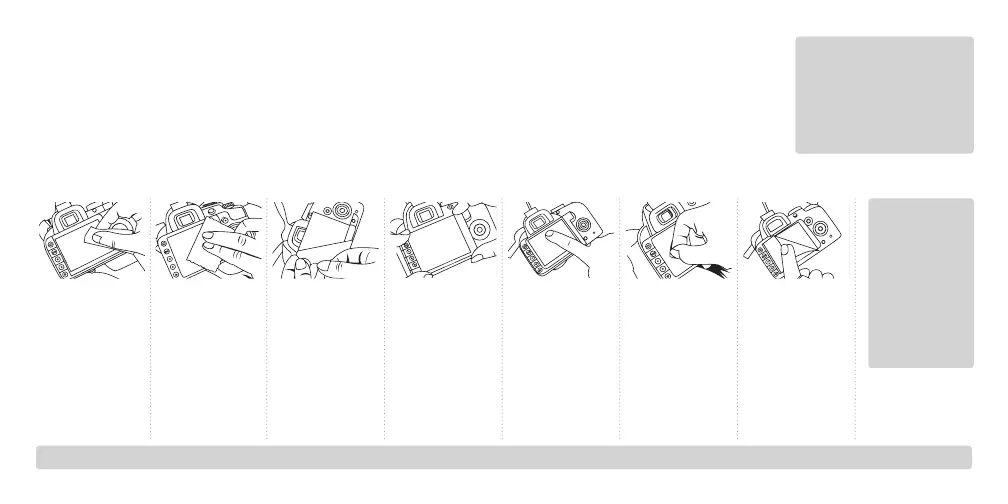
1. Remove any
films or other
intervening
substances from
your camera’s
LCD.
2. Clean the LCD
with the wet
wipe and then
wipe it dry with
the microfiber
cleaning cloth.
3. Peel o tape A
from the screen
protector. Be
careful not
to get any
fingerprints
on this side
of the screen
protector.
4. Make sure
your camera
is on a stable
surface, and
align the screen
protector with
you camera’s
LCD.
5. Press down
firmly on the
center of
the screen
protector and
push outwards
to apply.
6. Use the plastic
applicator to
smooth out any
air bubbles by
pushing them
out to the edge
of the screen
protector.
7. Peel o tape B
from the screen
protector.



 To Next Page