Playback, volume, & phone controls
Important: Playback,
volume, and phone control
functionality varies by media
device. When using the
audio by-pass cable, control
playback, volume, & phone
controls by using the media
device controls.
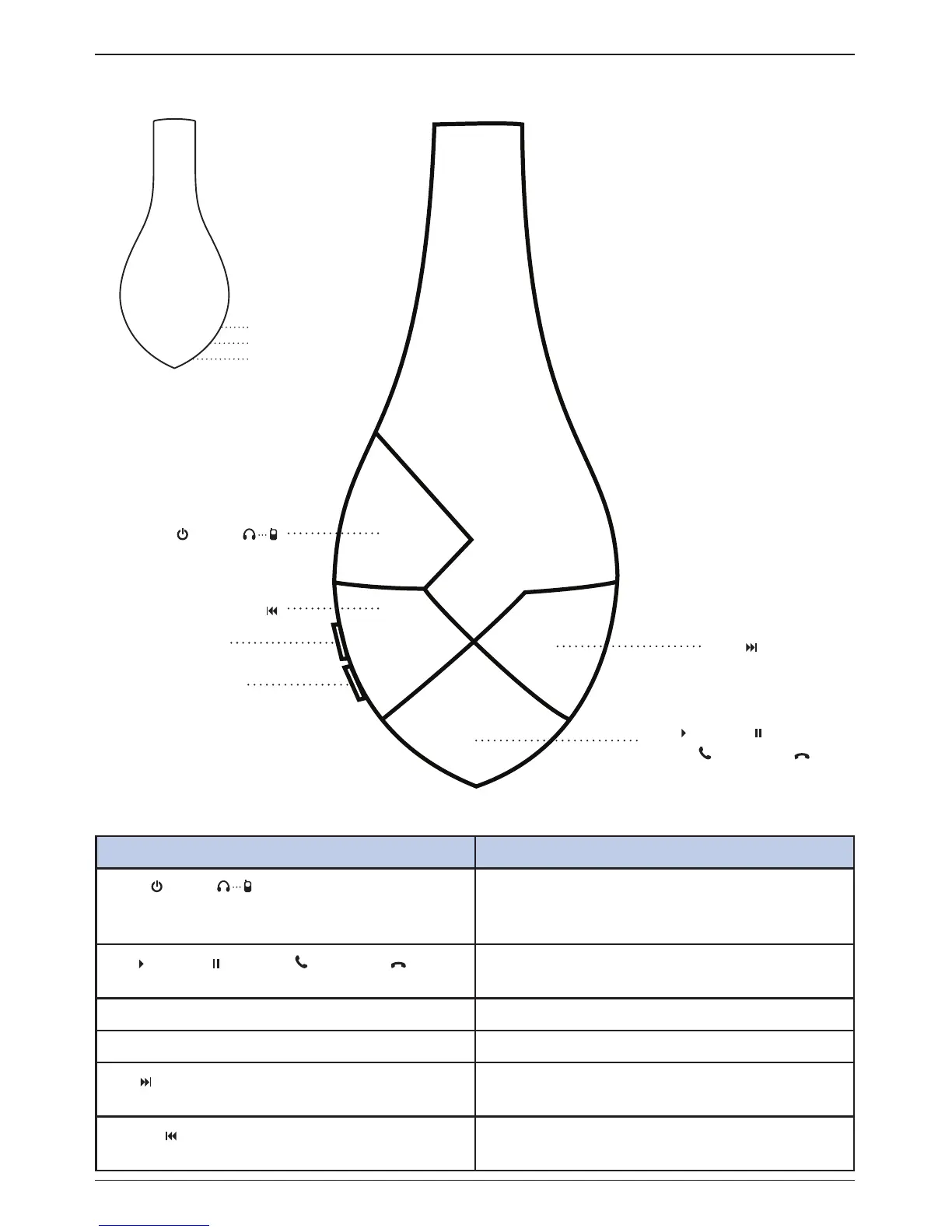
Button Function
Power / pair Long press (3 seconds) - power on
Long press while off (5 seconds)- pairing
Press and hold > 3 seconds - power off
Play / pause / answer / end call Short press - play/pause
Short press (while calling) - answer/end call
Volume up (+) Increase volume (max level indicated by beep sound)
Volume down (-) Decrease volume
Next Press once to go to next track
Press and hold to fast forward
Previous Press once to go to previous track
Press and hold to rewind
Button functions
Wired audio input
LED battery status
Micro USB port
Left
Page 4 of 9
vBold user’s guide
Play / pause /
answer / end call
Volume +
Volume -
Power / pair
Previous
Next
Right
NFC


 To Next Page