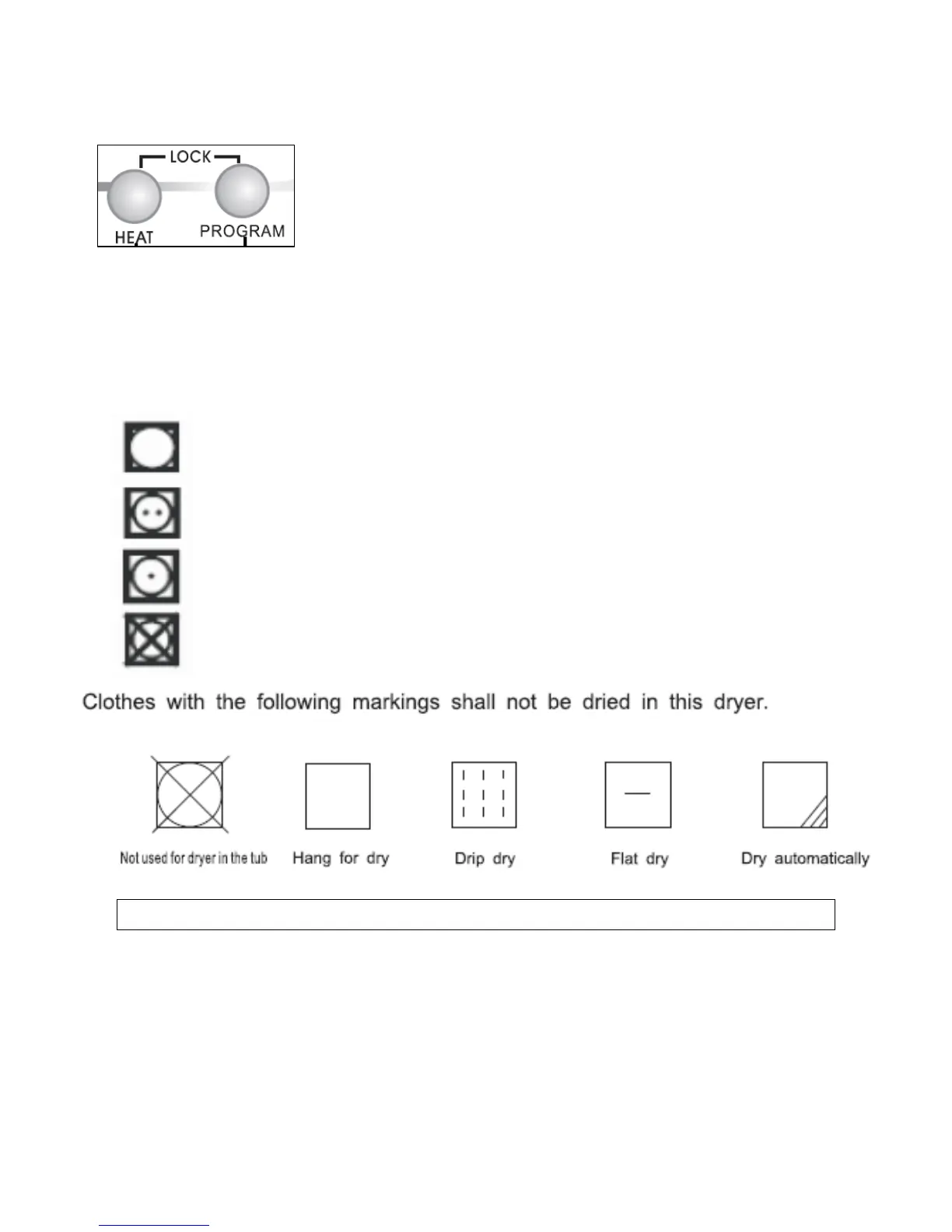
Locking the control panel
You have the option to lock the control panel to protect from accidental
misuse. All buttons except the power button will be inoperable.
o Press the “Heat” and “program” buttons
simultaneously for 2-3 seconds until the “lock”
Led is illuminated.
o Repeat this process to unlock the control panel
Care labels
o You may find the following symbols on the care labels of your
garments. These indicate how to dry the item correctly.
Tumble drying safe
Normal drying (high temperature)
Delicate drying (low temperature)
Do not tumble dry
Starting a drying program
o Open the tumble dryer door and load the clothes loosely into the
drum. Items such as sheets should be loaded corner-first.
o Close the door and dry your hands thoroughly.
o Press the start button (2) and the drum will begin rotating.
o The tumble dryer will stop when the drying program has completed.
12


 To Next Page