30 EN
Reminder/Interval Actions
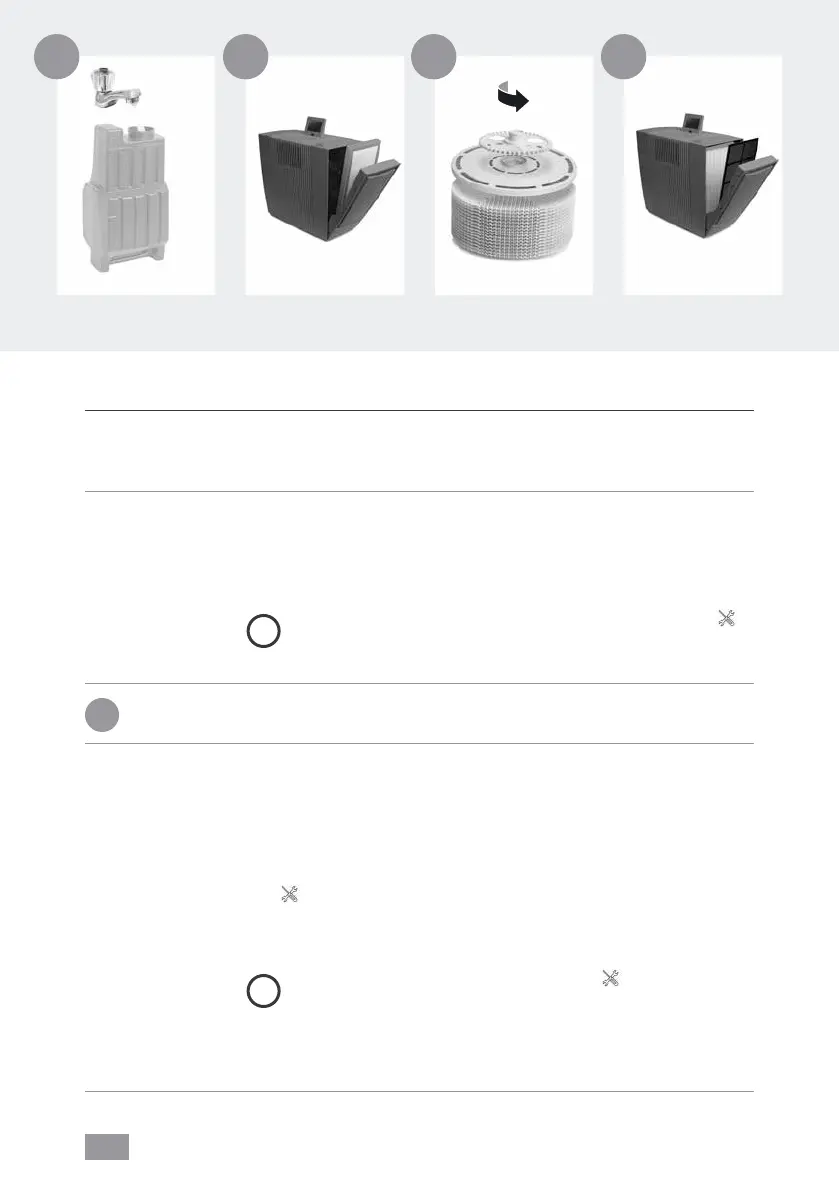
A FILL TANK Water tank empty, fill with fresh water.
Yellow: Humidification is still taking place.
Red: No humidification is taking place.
CLEANING For the cleaning process, you need a (250ml) bottle of Venta
appliance cleaner. Start the cleaning program by tapping the
CLEANING button on the display, then follow the instructions.
Cleaning takes approx. 4h.
i
After 6 months (of continuous 24-hour operation), the
maintenance button lights up in red and indicates that this
action is necessary.
!
Attention! Ensure that the device is switched off during the following actions
and the power plug is disconnected from the power supply!
B CHANGE
FILTER
When changing the HEPA filter, use suitable protective equip-
ment (e.g. mask and gloves). Place the used HEPA filter in a bag
and dispose of it in household waste.
Open lter compartment, remove coarse dust lter. Remove and
replace HEPA lter. Re-assemble the appliance and switch it on.
Tap
button on the display to access the maintenance menu.
Then tap RESET next to CHANGE FILTER and hold for 3 seconds
until the time is reset.
i
After one year, the maintenance button lights up in red
and indicates that this action is necessary. The filter
service life is approx. 1 year (of continuous 24-hour operation).
The lifetime of the filter depends on the hours of operation and
the air quality in the room.
A B
C D


 To Next Page