31EN
Reminder/Interval Actions
C CHANGE
HYGIENE DISC
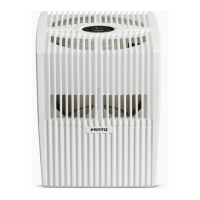
Open evaporator compartment. Remove VentWave™ disk stack
and unlock the drive wheel. Remove hygiene disk and replace it.
Re-assemble the appliance and switch it on. Tap
button on
the display to access the maintenance menu. Then tap RESET
next to CHANGE HYGIENE DISC and hold for 3 seconds until the
time is reset.
i
After 3 months, the maintenance button lights up in red
and indicates that this action is necessary.
The service life of a hygiene disk is approx. 3 months (at con-
tinuous 24-hour operation) and depends on the water hardness,
water quality, daily evaporation performance and number of
operating hours.
You can use the Venta ReNew recycling program to return
the hygiene disk to us (see RECYCLING & DISPOSAL).
SERVICE Empty the residual water out of the water tank and water tray.
Clean the water tray, VentWave™ disk stackand water tank un-
der running water. Fill the water tank up to the MAX marker with
fresh water. Re-assemble the appliance and switch it on. Tap
button on the display to access the maintenance menu. Then
tap the RESET button next to SERVICE and hold for 3 seconds
until the time is reset.
i
After 14 days, the maintenance button
lights up in red
and indicates that this action is necessary.
D Recommenda-
tion every 1–2
months or as
required
Open filter compartment, remove coarse dust filter and vacuum
or rinse it off. Please note: The coarse dust filter must be com-
pletely dry before you install it. Re-assemble the device.
Recommen-
dation every 3
years
To ensure the full performance of the UVC lamp, you should
change the bulb every 3 years.
Note:
UVC lamp is on for 4h per day or 1h in timer mode.
You can carry out the maintenance steps CHANGE FILTER, CHANGE HYGIENE DISC,
SERVICE and CLEANING whenever necessary. When you are finished, simply tap the
relevant RESET button in the maintenance menu
and hold for 3 seconds until the
time is reset. The next reminders for the actions performed will be indicated at the
normal intervals.
Any residues in the water tray and on the VentWave™ disk stack (white, green-yel-
low or brown deposits or discolorations) do NOT impair the function of the device.


 To Next Page