10
Ventana BenchMark GX Quick Reference Guide
88.
Manage Products
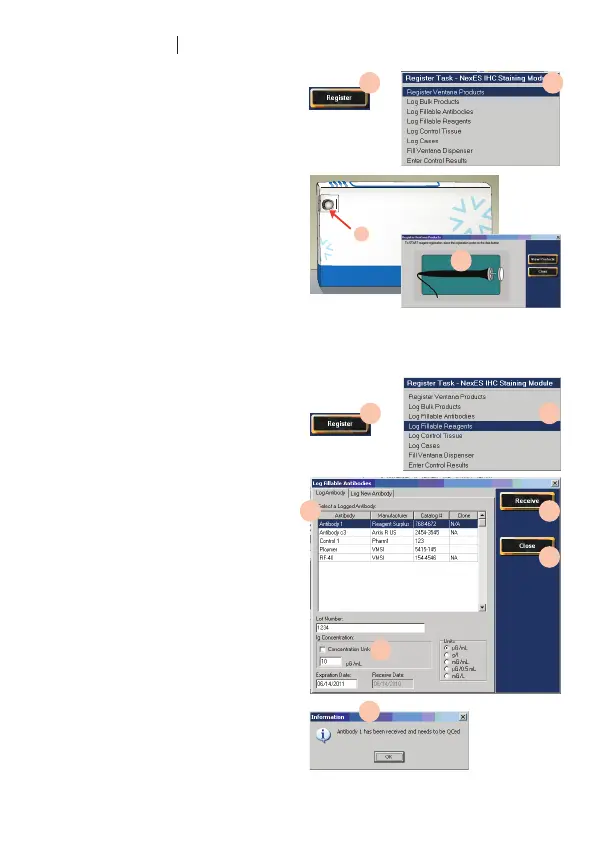
I. Register Ventana products
86. Click the Register icon in the main
screen.
87. In the Register Task menu, click Register
Ventana Products.
88. Press the registration wand to the data
button on the product package until
the product information is displayed.
Either a QC message or a Finalize button
will be displayed with the product
information.
89. If the QC message is displayed click the
OK icon.
II. Log customer-supplied products
90. Click the Register icon in the main
screen.
91. In the Register Task menu, click Log
Fillable Antibodies (or Reagents).
92. In the Log Fillable Antibodies window,
click the antibody name in the Select a
Logged Antibody list.
93. Enter the product Lot Number,
Concentration (if applicable) and
Expiration Date.
94. Click the Receive icon to record
the information and display the QC
message.
95. Click Ok to close the QC message.
96. Click the Close icon to return to the
main screen.
86.
90.
92.
93.
95.
94.
96.
91.
87.
89.



 To Next Page