5
Pairing
The product has been paired out of the factory. However, in case of pairing failure due to
improper operation or other circumstances during use, it is necessary to restore and pair
again the devices as follows.
First, press the receiver function button for more than three seconds, and the prompt will
pop up on the interface: “Connecting… enter pairing mode”. Then, press the transmitter
function button for more than five seconds, the indicator will flash for pairing, and after the
transmitter indicator light turns solid, the connection is successful.
Frequently Asked Questions
How to perform factory reset?
The factory reset can be performed as a troubleshooting step. Press and hold the
receiver function button for 10 seconds. After a black screen appears and restart is
observed, the factory reset will be performed.
Can devices without an HDMI interface be used?
Yes, you can use the device with an HDMI converter.
How to enter privacy mode?
Tap the transmitter function button to disconnect and reconnect.
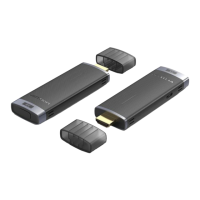
Receiver [RX]
function button
Transmitter [TX]
function button
Indicator
Slowly flashing = disconnected
Fast flashing = pairing
Solid on = connected


 To Next Page