EasyManua.ls Logo

Verbatim Portable USB - System Connection; Operation; Windows ME Audio Detection Troubleshooting

Verbatim Portable USB
48 pages
Print Icon
To Next Page IconTo Next Page
To Previous Page IconTo Previous Page
Loading...
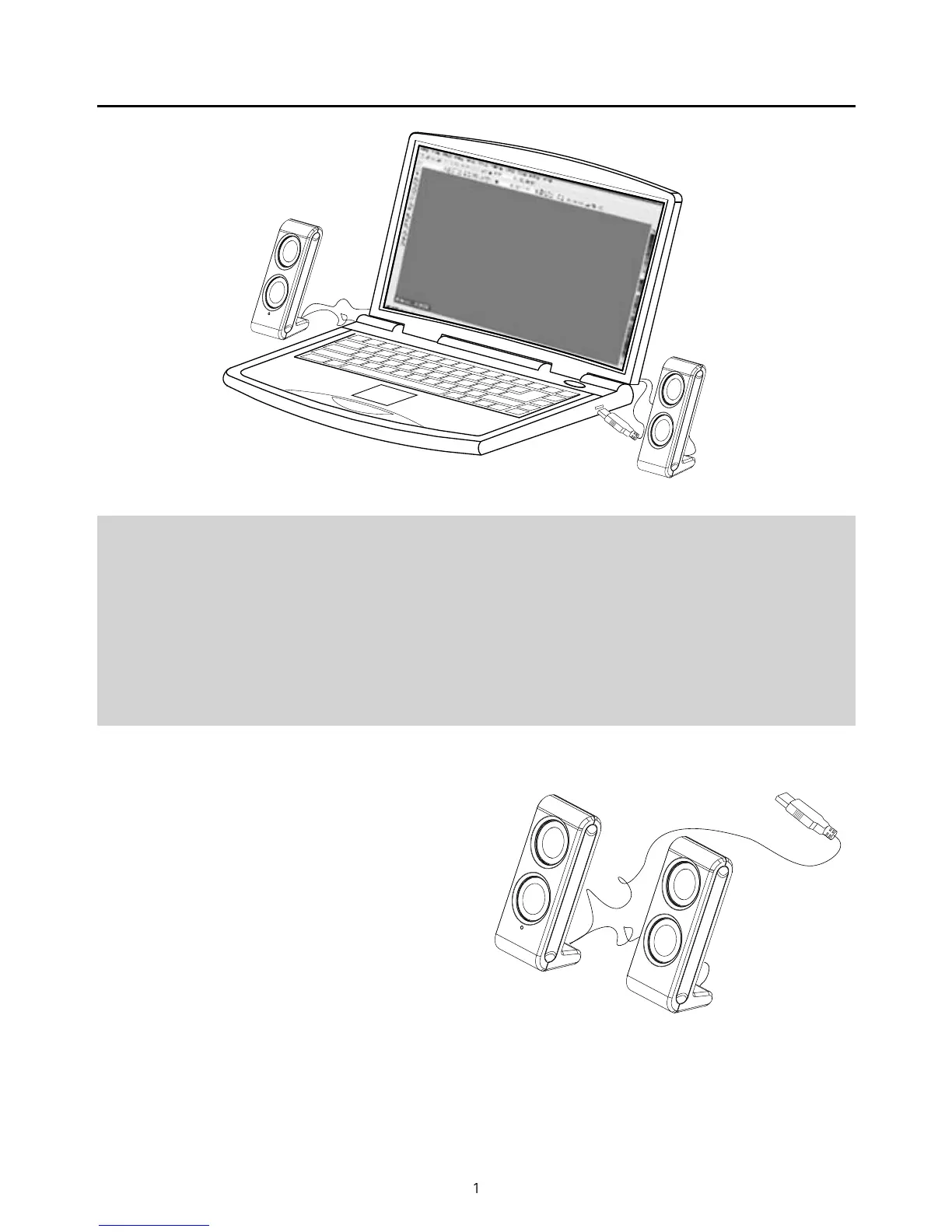
1
Op
eratio
n
1
. P
l
ug t
h
e USB connecting ca
bl
e into t
h
e
l
aptop/P
C
2. T
h
e
bl
ue LED in
d
icator
l
ig
h
ts up on t
h
e rig
h
t spea
k
er to s
h
ow operation
3. To remove the speaker
f
rom the laptop/PC remove the USB
connecting cable
f
rom the laptop/PC
N
OTE
:
Some times Win
d
ows ME may not
utomatica
y
etect t
e USB Au
io
device. I
f
this occurs open the
Contro
l
Pane
l
wit
h
in
S
etting
s
on
t
h
e
S
tart up Menu an
d
open t
h
e
Soun
d
s an
d
Au
d
io Devices option
.
Se
l
ect t
h
e
A
u
d
io page an
d
switc
h
the De
f
ault Device to USB Devic
e
or
C
-Me
d
ia USB Au
d
io
,
an
d
c
l
ic
k
App
l
y.
U
SB Connecting
C
able
S
y
stem Connect
i
on

Related product manuals