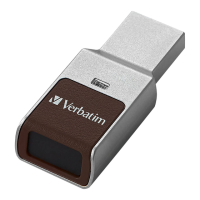
The Verbatim Fingerprint Secure USB Drive is an external data storage device designed for secure data management through fingerprint recognition and hardware encryption. This user manual provides comprehensive instructions for setting up, managing, and accessing the device, ensuring optimal performance and data security.
Function Description:
The primary function of the Verbatim Fingerprint Secure USB Drive is to provide secure, portable data storage. It utilizes fingerprint recognition technology to prevent unauthorized access to stored data, making it ideal for users who need to protect sensitive information. The device features a secure partition that can only be accessed by authorized users whose fingerprints have been enrolled. In addition to fingerprint access, an administrator password serves as a backup access method for the administrator. The drive includes a Virtual DVD RW Drive, which is an undeletable partition storing the Fingerprint Secure software and user manuals. This ensures that the necessary software is always available on the device itself. The device supports multiple user profiles, allowing an administrator to add, remove, or edit user privileges, defining whether a user has full read/write access or read-only access to the secure partition. This granular control over access rights enhances data security and management in shared or multi-user environments. The 256-bit AES Hardware Encryption further strengthens data protection by encrypting all data stored on the secure partition, making it virtually impossible for unauthorized individuals to access the information even if they bypass the fingerprint authentication.
Important Technical Specifications:
- Interface: USB 3.0, ensuring high-speed data transfer.
- Speed: Supports USB Super-speed (5Gbps), High-speed (480Mbps), and Full-speed (12Mbps) operation, providing flexibility and efficiency for various data transfer needs.
- Encryption: Includes 256-bit AES Hardware Encryption, offering robust data security.
- Operating System Compatibility:
- PC: Windows 7 / 8 / 10.
- Mac: Mac OS X 10.4 or higher (specifically mentioned 9.1, 9.2, 10.1.5, 10.2, 10.3).
- System Requirements:
- PC: Minimum Intel Processor Pentium II/50MHz, 64MB RAM, Active USB port.
- Mac: Minimum Apple G processor, 64MB RAM, Active USB port.
- Package Contents: Verbatim Fingerprint Secure USB Drive, User Manual (pre-loaded to the drive).
Usage Features:
The Verbatim Fingerprint Secure USB Drive offers several user-friendly features for secure and convenient data access:
- Administrator Setup: The initial setup involves connecting the drive to a PC, opening the Fingerprint Secure User Manager application, and setting up an administrator password. This password acts as a backup access method.
- Fingerprint Enrollment: Administrators are required to enroll their fingerprints by gently pressing and releasing their finger on the sensor multiple times, varying the angle and roll for better recognition. This process creates a secure biometric profile for access.
- User Management: An administrator can add new users, remove existing users, or modify their privileges using the Fingerprint Secure User Manager software. This allows for flexible access control, assigning either "Admin" (read/write) or "Read Only" privileges to each user.
- Administrator Privileges: Users with administrator rights can use the "Fingerprint Secure User Manager" software to manage other users and access the secure partition with read/write capabilities.
- Read Only Privileges: Users with read-only privileges can only read data from the secure partition and are unable to add, change, or delete files.
- Accessing the Secure Partition:
- Without Software: After connecting the drive and waiting for the LED to stop flashing, users can gently place their enrolled finger on the sensor. If recognized, the secure partition file folder will appear in "My Computer," allowing access to the secure data. If it doesn't open automatically, users are advised to try touching a different part of their fingerprint on the sensor.
- With Software: Users can also open the Fingerprint Secure application on their PC and then gently place their enrolled finger on the sensor. A tick mark will appear on the software interface if the fingerprint is recognized, and the secure partition will open. If the fingerprint is not recognized, an "X" will be displayed, prompting the user to try again with a different part of their fingerprint.
- LED Indicator: The device includes an LED indicator, which likely signals its status (e.g., flashing during connection, solid when ready for fingerprint scan, or indicating successful/unsuccessful recognition).
Maintenance Features:
While the manual does not explicitly detail "maintenance features" in a traditional sense (like cleaning instructions or firmware updates), it emphasizes ongoing user management and data integrity:
- User Privilege Management: The ability to add, remove, and edit user privileges is a key maintenance feature for controlling access to sensitive data. This allows administrators to adapt access rights as personnel changes or security requirements evolve.
- Backup Administrator Password: The administrator password serves as a critical backup access method, ensuring that the secure partition can still be accessed even if fingerprint recognition fails or the administrator's fingerprint cannot be used. This is a vital safeguard for data recovery and continuity.
- Software Updates: Although not explicitly stated as a user-initiated maintenance task, the statement "We reserve the right to upgrade our products in keeping with technological advances" implies that Verbatim may release software updates to improve functionality, security, or compatibility, which users would likely be encouraged to install.
- Support Resources: The manual directs users to www.verbatim.com/support for technical assistance, questions about the product, or information on other Verbatim products. This online support portal acts as a primary resource for troubleshooting and staying informed about the device.
- Compliance and Environmental Responsibility: The device adheres to various compliance standards, including FCC, WEEE, CE, and RoHS.
- FCC Compliance: The device is tested to comply with Class B digital device limits, ensuring it does not cause harmful interference in residential installations. Users are advised on measures to correct any radio or television reception interference.
- WEEE Notice: The WEEE logo on the product indicates that it should not be disposed of with household waste, promoting proper recycling and environmental responsibility at the end of its life.
- CE Declaration: The device complies with EU directives for Electromagnetic Compatibility and Low Voltage Protection.
- RoHS Compliance: The product complies with the Directive on the restriction of hazardous substances in electrical and electronic equipment, ensuring it is free from certain harmful materials above permitted levels.
In summary, the Verbatim Fingerprint Secure USB Drive is a robust and secure portable storage solution, leveraging biometric authentication and hardware encryption to protect data, while offering flexible user management and broad compatibility with various operating systems.

 Need help?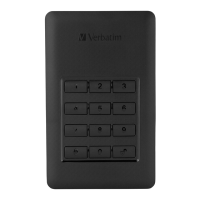









 To Next Page
 General