Removing a faulty power supply
Use the following procedure to remove a faulty power supply.
To remove a faulty power supply
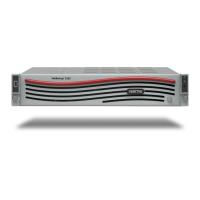
1 Verify that the LED on the faulty power supply is amber.
If the LED is green or blinking green, the power supply is working properly. Blinking green indicates
that the power supply is currently being used to power the appliance. If the LED is amber, the
power supply needs to be replaced.
2 Put on an ESD-compliant wrist strap or take other ESD-protective measures.
3 Check the following to verify that it is safe to remove the power supply before you disconnect the
power:
• The LED on the other power supply is solid green.
• The LED on the target power supply is amber.
4 Disconnect the power cable from the faulty power supply only.
3
HSP 177: Power Supply Replacement


 To Next Page