Need help?
Do you have a question about the Verity Medical NeuroTrac MultiTENS and is the answer not in the manual?
Explains various symbols found on the unit and case.
Covers warnings about clinician guidance, equipment type, mains power, immersion, and batteries.
Highlights key features like Multi TENS mode, Backlight, and Statistics.
Explains the body's process of pain perception and chronic pain.
Defines TENS as a non-invasive, drug-free pain control method.
Explains STIM for muscle and nerve fiber stimulation.
Lists conditions where TENS/STIM should not be used.
Details specific areas where electrodes must not be placed.
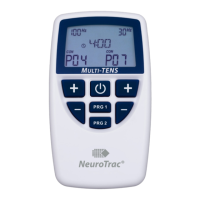
Identifies and describes the unit's buttons, ports, and display.
Explains the specific functions of PRG, SET, ESC, and Power buttons.
Guides through battery insertion, lead wire connection, and powering on.
Explains LCD elements and views during operation.
Details how to adjust the time for pre-set programmes.
Guides the process of customizing programmes and phases.
Explains setting frequency and pulse width for CON mode.
Details setting frequency, pulse width, and modulation for MOD mode.
Explains setting frequency, pulse width, and bursts per second for BST mode.
Details setting frequency, pulse width, work/rest, and ramp times for NMS.
Explains the mA lock feature for safety and how to use it.
Lists pre-set TENS programmes with mode, frequency, and time.
Lists pre-set STIM programmes with mode, frequency, and time.
Lists available custom programme types (CON, BST, MOD, WR).
Describes Constant, Burst, Modulated, and Work/Rest TENS.
Explains the concealed lock button for monitoring patient compliance.
Details the procedure for locking the unit to start recording statistics.
Describes how to view total days, hours, and average intensity used.
How to use buttons to scroll through daily usage statistics.
How to view session time and average mA for each session.
How to check which programme was used for each session.
How to set the calendar date for accurate statistics.
Steps to unlock the unit by pressing concealed button and PRG.1.
Steps to completely delete recorded statistics from the unit.
How to review and set the unit's internal clock and calendar.
Explains how to select the rate (frequency) for TENS.
Explains the effect and selection of pulse width for TENS.
Guide to setting intensity levels for comfortable stimulation.
Details the conventional TENS mode settings and usage.
Explains the Burst Mode, comparable to acupuncture-like TENS.
Describes Modulation TENS for preventing nerve accommodation.
Provides guidance on typical session duration for pain relief.
Emphasizes consulting a professional for optimal placement.
Explains dermatomes and myotomes in relation to nerve roots and skin areas.
Describes the common method of placing electrodes alongside the spine.
Discusses using acupuncture points for effective electrode placement.
Provides advice on the lifespan and care of self-adhesive electrodes.
Lists available electrode shapes, codes, and descriptions.
Offers tips for electrode adhesion and maintenance.
Diagram showing electrode placement for finger arthritis.
Diagram showing electrode placement for knee arthritis.
Diagram showing electrode placement for trigeminal neuralgia.
Diagrams showing two electrode placement options for cervical issues.
Diagram showing electrode placement for overorbital headaches.
Diagram showing electrode placement for mandibular syndrome.
Diagram showing electrode placement for Herpes Zoster.
Diagram showing electrode placement for phantom limb pain.
Diagram showing electrode placement for back pain.
Diagram showing electrode placement for menstrual pain.
Diagrams showing two electrode placement options for lumbar pain.
Diagram showing electrode placement for tooth ache.
Diagrams showing two electrode placement options for sciatic pain.
Diagram showing electrode placement for epicondylitis.
Diagram showing electrode placement for shoulder pain.
Diagram showing electrode placement for feet pain.
Diagram showing electrode placement for ankle pain.
Instructions for cleaning and disposing of the control unit.
Guidance on battery replacement, checking, and disposal.
Advice on handling, checking, and disposing of lead wires.
Instructions for checking and replacing self-adhesive electrodes.
Lists factors that reduce electrode lifespan.
Provides tips for optimal electrode performance and storage.
Lists specific pain conditions that TENS can help.
Lists conditions where STIM/NMS is beneficial.
Mentions non-medical uses like muscle strength and warm-up.
Details EMC emission test results and guidance for use.
Outlines immunity tests and environmental guidance for safe operation.
Explains RF immunity tests and recommended separation distances.
Provides separation distance recommendations for RF communications equipment.
Lists technical specs: amplitude, waveform, pulse width, rate, and modes.
Details battery type, life, and low battery indicators.
Provides expected service life, physical dimensions, and weight.
Specifies operating and storage environmental conditions.
Outlines the 2-year warranty period and terms.
Instructions for customer service, warranty returns, and manufacturer contact.
Provides manufacturer's address, contact details, and compliance information.
Diagrams showing dermatome areas on the anterior view of the body.
Diagrams showing dermatome areas on the posterior view of the body.
Addresses issues like inability to reach mA level or unit cutting off.
Explains common connection issues with skin electrodes and lead wires.
Discusses TENS effectiveness across patients and conditions.
Lists contraindications for TENS usage.
Provides guidance on how long TENS should be used.
Directs users to healthcare professionals for clinical advice.
Directs users to the website for the latest clinical protocols.
Provides contact information for clinical references.
 General
| Category | Medical Equipment |
|---|---|
| Frequency Range | 1-150 Hz |
| Power Source | Battery |
| Waveform | Biphasic |
| Pulse Width | 50-300μs |
| Modes | Burst, Modulation |
| Battery Type | 9V |
| Dimensions | 11.4 x 6.4 x 2.8 cm |
| Weight | 0.14 kg |
| Type | TENS (Transcutaneous Electrical Nerve Stimulation) |

 To Next Page