EasyManua.ls Logo

Verizon Fios TV One - User Manual

Verizon Fios TV One
6 pages
Print Icon
To Next Page IconTo Next Page
Loading...
2/12/2019 10:36:00 AM - 1 - 20190209VoiceRemote.docx
Hello All, FiOS Voice Activated Remotes are now available!
FiOS TV One has just been announced and has the following main capabilities:
Voice Activated Remotes, Wi-Fi (Wireless) Connectivity, BlueTooth Remotes
Read All the Tips and Hints below to understand how the new FiOS TV One works.
Quick Tips and Hints:
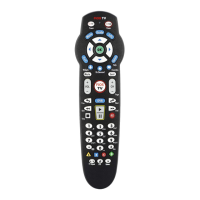
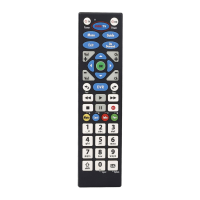
1. Voice Activated Remotes. The new Remote is smaller with fewer buttons, so it is easier to
hold in your hand. See the photo below comparing the current remote to the new remote. Also,
further below is a picture of the new remote with each button labeled for ease in understanding
how to use the new remote. Under the second photo is an excellent guide on how to use the
remote.
2. Works with newer flat screen TV’s and older TV’s. The new FiOS TV One is designed
to operate with newer flat screen TVs that have an HDMI cable connector. Older TV’s that use
a Digital Adapter “Box” today (those TV’s that connect using 3, colored wires) can be
connected but need a different type adapter than the Digital Adapter currently being used. The
new ‘adapter’ is a “Composite Cable Adapter” (a short cable). The cost is $4 as opposed to the
$7.99/month for the Digital Adapter ‘Box’. You will no longer need the Digital Adapter ‘Box’
for the older TV’s. The Digital Adapter ‘Boxes’ must be returned or you will be charged for
them. One new type adapter should be included when you receive the equipment. If you need
the new type adapters, be sure to say how many you will need when you place your order.
Additional adapters can be purchased for approximately $4.00. Be sure to ask for Postage Free
labels and return mailing boxes to be sent to you to return the Digital Adapter Boxes.
3. WiFi Connectivity (Wireless Connecting) means you may position your TV’s, other than
the TV connected to your ‘Main’ Set Top Box, anywhere there is a strong WiFi signal, even
though there is no cable outlet available. The ‘Main’ Set Top Box must be directly connected to
the Router through a coax cable. Assuming you are replacing a current ‘Main’ Set Top Box, this
cable is currently in place. Also, all homes in HM that have FiOS service have WiFi even if
you do not currently utilize it. In other words, other TV’s with Set Top Boxes may be placed
anywhere in your home, where there is strong WiFi signal, because the new set-top boxes can
use either coax cable or WiFi for connectivity. See NOTE #5 below.
4. BlueTooth Remotes means you do not have to point the new Remote at a Set Top Box for
them to work. The new remotes are BlueTooth meaning they have a range of up to 25 feet and
do not have to be pointed directly at the Set Top Box to function. The Fios TV Voice Remote
connects with your Fios TV One via a wireless Bluetooth connection so it will still work if
your Fios TV One is hidden in a cabinet or other non-metal enclosure—as long as it’s not
farther than 25 feet away. Note: if your Fios TV One Set Top Box is enclosed, please make sure
it gets adequate ventilation to prevent overheating.

Other manuals for Verizon Fios TV One

Question and Answer IconNeed help?

Do you have a question about the Verizon Fios TV One and is the answer not in the manual?

Summary

FiOS TV One Quick Tips and Hints

Voice Activated Remotes

New remote is smaller with fewer buttons, making it easier to hold and use.

TV Compatibility and Adapters

Works with newer/older TVs; composite adapter needed for older models, costing $4.

WiFi Connectivity

Allows flexible set-top box placement using strong Wi-Fi signals, no cable outlet needed.

BlueTooth Remote Functionality

Bluetooth connection up to 25ft, works even if box is hidden in non-metal enclosure.

Ordering, Setup, and Support

Ordering New Equipment

Call to order; list current equipment; new system components are mailed.

Equipment Return and Installation

Must return old equipment; $99 installation fee, waivable for medical reasons.

Technical Support

Contact Tech Support for self-installation assistance; confirm trained personnel.

Voice Remote Features and Operation

Find My Fios TV Voice Remote

Use Fios TV One to make misplaced remote beep.

Motion-Activated Light

Sensor activates light for better visibility in the dark.

Wireless Bluetooth Connection

Connects via Bluetooth; works within 25 feet, even if box is hidden.

Voice Search

Use voice commands to find content, actors, tune channels, control playback.

Remote Button Functions and Voice Commands

Key Button Functions

Describes Menu, Guide, Navigation, Back, Exit, Info, Mute, Playback, Channel buttons.

Voice Command Examples

Samples for searching content, navigating menus, and adjusting settings.

Summary

FiOS TV One Quick Tips and Hints

Voice Activated Remotes

New remote is smaller with fewer buttons, making it easier to hold and use.

TV Compatibility and Adapters

Works with newer/older TVs; composite adapter needed for older models, costing $4.

WiFi Connectivity

Allows flexible set-top box placement using strong Wi-Fi signals, no cable outlet needed.

BlueTooth Remote Functionality

Bluetooth connection up to 25ft, works even if box is hidden in non-metal enclosure.

Ordering, Setup, and Support

Ordering New Equipment

Call to order; list current equipment; new system components are mailed.

Equipment Return and Installation

Must return old equipment; $99 installation fee, waivable for medical reasons.

Technical Support

Contact Tech Support for self-installation assistance; confirm trained personnel.

Voice Remote Features and Operation

Find My Fios TV Voice Remote

Use Fios TV One to make misplaced remote beep.

Motion-Activated Light

Sensor activates light for better visibility in the dark.

Wireless Bluetooth Connection

Connects via Bluetooth; works within 25 feet, even if box is hidden.

Voice Search

Use voice commands to find content, actors, tune channels, control playback.

Remote Button Functions and Voice Commands

Key Button Functions

Describes Menu, Guide, Navigation, Back, Exit, Info, Mute, Playback, Channel buttons.

Voice Command Examples

Samples for searching content, navigating menus, and adjusting settings.

Overview

This document describes the features and usage of the Fios TV One system, focusing on its new voice-activated remote controls and connectivity options.

Function Description:

The Fios TV One is a new television system designed to enhance the user experience with advanced remote control capabilities and flexible connectivity. It aims to simplify TV interaction through voice commands and improve setup flexibility with wireless options. The system is compatible with both newer flat-screen TVs with HDMI and older TVs that previously used a Digital Adapter "Box."

Usage Features:

Voice Activated Remotes:

The new Fios TV Voice Remote is designed for ease of use. It's smaller with fewer buttons, making it comfortable to hold. The remote features a microphone button for voice commands, allowing users to search for content, navigate menus, and control playback simply by speaking. To use voice search, press and hold the microphone button, speak your command (e.g., "What's on Animal Planet tonight?", "Go to the guide", "Skip forward 30 minutes"), and then release the button. It's recommended to hold the remote about 12 inches from your mouth for clear voice recognition. The remote also includes a motion-activated light sensor on the back, which illuminates the remote in the dark for better visibility.

Bluetooth Connectivity for Remotes:

The new remotes utilize Bluetooth technology, meaning you don't need to point them directly at the Set Top Box for them to work. This provides a range of up to 25 feet, allowing the Fios TV One Set Top Box to be hidden in a cabinet or other non-metal enclosure, as long as it receives adequate ventilation to prevent overheating.

Finding a Misplaced Remote:

If you misplace your Fios TV Voice Remote, you can easily locate it by pressing the power button on the Fios TV One twice. The paired remote will then emit a beeping sound. Pressing any button on the remote will silence the beeping once found.

The remote includes standard navigation buttons:

  • Menu: Takes you to the main on-screen menu.
  • Guide: Accesses the programming grid guide. Pressing it again allows you to choose another view.
  • Navigation Ring and OK/Select: Used for moving up, down, left, or right within menus and making selections.
  • Skip Forward and Back: The left and right navigation ring segments can be used to skip video forward or back when using DVR or Video on Demand.
  • Back (arrow) button: Returns to the previous screen.
  • Exit button: Leaves the current menu and returns to normal TV viewing.
  • Info button: Displays more details about the current show.
  • Mute Button: Mutes the TV sound.
  • Play/Pause, Rewind, and Fast Forward buttons: Control playback for Live TV, Video On Demand, and DVR recorded programs. Tapping Rewind or Fast Forward increases or decreases video speeds. A long press jumps to the beginning of shows or the live point of currently airing programs.
  • Channel / Page +/-: Changes channels up or down, or pages up or down in the Guide.
  • Last button: Toggles between the last two programs watched.
  • Record: Records the current live TV program from the moment you started watching it.

Voice Commands Examples:

  • Search: "What's on Animal Planet tonight?", "I want to watch Property Brothers", "Look for comedies starring Jim Carrey", "Show me Disney movies".
  • Navigation: "Tune to HGTV", "Go to the main menu", "Go to the guide", "Go to settings", "Skip forward 30 minutes", "Jump back 1 hour", "Go to DVR", "Go to On Demand", "Skip forward 30 seconds".
  • Settings: "Turn on talking guide", "Turn off closed captioning" (for select programs), "Turn on Spanish audio" (for select programs), "Turn on descriptive video" (for select programs), "Launch my dashboard", "Show my Wi-Fi Credentials", "Pay My Bill".

WiFi Connectivity (Wireless Connecting):

The Fios TV One system allows for flexible placement of TVs. Set Top Boxes (other than the 'Main' box) can be positioned anywhere in your home with a strong WiFi signal, eliminating the need for a cable outlet. The 'Main' Set Top Box, however, must be directly connected to the Router via a coax cable. All homes with Fios service have WiFi, even if not actively utilized, making this feature widely accessible.

Compatibility with Older TVs:

For older TVs that previously used a Digital Adapter "Box" (connecting with three colored wires), the Fios TV One system uses a "Composite Cable Adapter" (a short cable) for connectivity. This adapter costs $4, replacing the $7.99/month Digital Adapter "Box." One new type adapter should be included with the equipment, but additional ones can be purchased.

Ordering and Installation:

To order the new FiOS TV One equipment, call 1-800-501-1172. It's important to list all current TV equipment to ensure the correct new components are sent. The new equipment cannot be mixed with old equipment. There is no change in monthly cost, unless additional services are ordered or if Digital Adapters were previously in use. A $99.00 installation fee may apply but can be waived if you state you are unable to self-install for medical reasons. Tech Support (1-888-553-1555) is available for self-installation assistance, but it's crucial to ensure you speak with a trained FiOS TV One Tech Support Team Member, as this is a new system.

Maintenance Features:

Returning Old Equipment:

All current Set Top Boxes, Remote Controls, DVRs, and Digital Adapters MUST be returned within a specific timeframe using Verizon-supplied postage-paid labels and boxes. Failure to return Digital Adapter "Boxes" will result in charges. When ordering new equipment, be sure to ask for postage-free labels and return mailing boxes for the old Digital Adapter Boxes.

Ventilation for Enclosed Set Top Boxes:

If the Fios TV One Set Top Box is placed in an enclosed cabinet or other non-metal enclosure, ensure it receives adequate ventilation to prevent overheating.

System Expansion:

If you have more than five TVs, an additional 'Main Set Top Box' will be required to power the remaining TVs beyond the initial five. It's important to confirm this with the Call Center Representative when ordering.

Verizon Fios TV One Specifications

General IconGeneral
Voice ControlYes
Backlit KeysYes
Power SourceBattery
Battery Type2 x AA
CompatibilityVerizon Fios TV One
Programmable ButtonsYes

Related product manuals